A medical alert system is a wearable help button that connects an older adult to a 24/7 monitoring center or to a preset list of contacts, so they can reach help without getting to a phone.
Has a parent had a close call, or a sibling asked what the family plans to do about Mom living alone? From the outside the market looks impossible. There are dozens of brands, near-identical product photos, and pricing pages that advertise a monthly number without mentioning the device fee underneath it.
Three decisions sit under all of it. Make them in order and the field of best medical alert systems narrows to two or three names you can actually call.
- Monitored or unmonitored. Does a trained responder answer the alert, or does the device dial 911 and your cell number?
- In-home or mobile. Does protection need to reach the driveway, the grocery store, and the church parking lot, or only the house?
- Worn or carried. Pendant, wristband, medical alert watch, or something that lives on a nightstand?
This guide walks through those three decisions, then puts real, dated 2026 prices beside each one to compare a full year’s cost before anyone signs anything. Your parent should be part of the conversation wherever possible. The system a family picks together tends to be the system that stays on.
Key takeaways
- Monitored medical alert plans generally cost about $20 to $60 a month, depending on the type of system and features included.
- Automatic fall detection is an add-on at most major providers, costing about $10 to $11 a month on top of the base plan.
- Equipment runs $0 to $200 depending on whether you lease or buy, and activation or setup fees range from $25 to $100 when a provider charges them.
- Unmonitored devices and consumer smartwatches skip the monthly fee but route to 911 or a family contact instead of a trained responder.
- Original Medicare does not cover medical alert systems, though some Medicare Advantage and long-term care insurance plans do.
- No system helps during the hours it spends off the body, which makes charging design and comfort a safety question rather than a convenience one.
What a Medical Alert System Is and How It Works
Strip away the branding and every one of these products has the same basic purpose: helping an older adult reach assistance in an emergency. The sensing step is a button press, a spoken command, or an automatic fall alert. What happens next depends on the system. Monitored devices connect the wearer to a trained responder who assesses the situation and dispatches help, while unmonitored devices call 911 or preset emergency contacts directly.
The industry term for this category is PERS, short for personal emergency response system. It turns up on insurance paperwork and Veterans Affairs benefit documents more often than in advertising, and our guide to personal emergency response systems goes deeper on the equipment side.
Who is actually on the other end
This is the part families most often get wrong. With a monitored plan, pressing the button opens a two-way voice channel to a staffed monitoring center. A trained responder speaks to your parent, decides whether this is a fall, a medication problem, or a false alarm, and dispatches EMS or calls you.
Unmonitored devices skip that layer. AARP’s medical alert buying guidance, updated in May 2026, describes them as systems that connect directly to 911 or to designated contacts when activated. Nobody assesses the situation first, and nobody stays on the line if your parent cannot answer.
What the system does not do
Most medical alert systems for seniors are response tools, not prevention tools. They shorten the gap between a fall and a knock at the door. They do not make a bathroom floor less slippery, catch a blood pressure drop before it happens, or replace a home safety walkthrough. Families who treat the device as one layer among several get more out of it than families who treat it as the whole plan.
Types of Medical Alert Systems: Monitored vs Unmonitored, In-Home vs Mobile
Those two questions produce four practical categories, and almost every product on the market falls into one of them. In-home systems pair a base unit with a pendant or wristband and work within a set radius of that base unit. Mobile systems drop the base unit and carry their own cellular connection and GPS on the wearable itself, allowing them to work away from home.
The table below compares the four categories. Monthly costs vary by provider, plan, and optional features such as fall detection.
| Category |
Who answers the alert |
Where it protects |
Typical monthly cost (2026) |
Fits a parent who |
| Monitored in-home |
Trained responder at a 24/7 monitoring center |
House and yard, within range of the base unit |
About $25 to $50 |
Spends nearly all day at home |
| Monitored mobile |
Trained responder at a 24/7 monitoring center |
Anywhere with cellular coverage |
About $30 to $55 |
Drives, walks, gardens, or travels |
| Unmonitored in-home |
Family contacts, or 911 |
Inside the house |
Equipment cost, little or no subscription |
Lives with someone reliably reachable |
| Unmonitored wearable |
911 dispatch, plus emergency contacts |
Anywhere the device has signal |
Hardware plus any cellular plan |
Already wears a smartwatch by choice |
Where consumer smartwatches land
Consumer smartwatches such as the Apple Watch and Samsung Galaxy Watch sit in a different category. They offer features such as fall detection and emergency calling, but they are not dedicated monitored medical alert watches. That distinction matters most when your parent is unconscious or disoriented: a monitoring responder can already have their location, medical information, and family contacts available when an alert comes in.
Choosing between the four
Track where your parent actually spends their waking hours for a week before you decide. A retired teacher who walks two miles every morning needs mobile coverage. Someone recovering from hip surgery who has not left the house in a month may be better served by a cheaper in-home plan now and a mobile upgrade later. If you want a structured worksheet for that, our guide on how to compare medical alert systems sets out the feature-by-feature method.

The Key Features That Actually Matter: Fall Detection, GPS, Battery, Wearability
Provider comparison charts list twenty or thirty features. Four of them change outcomes: whether the device detects a fall on its own, whether it can be located outside the home, how it handles power, and whether your parent will keep it on. Everything else is preference.
Fall detection uses motion sensors to recognize the pattern of a fall and send an alert without a button press, which is the whole point when someone is knocked unconscious or cannot reach their wrist. The best medical alert systems with fall detection pair that sensing with a short cancel window so a dropped pendant does not summon an ambulance. No system detects every fall, and no honest provider will tell you otherwise. Treat it as a strong layer rather than a promise. Our guide to the best medical alert devices breaks down how the sensors and algorithms differ across products.
GPS and why it is not just for travelers
GPS earns its keep in ordinary situations. A parent who becomes disoriented three blocks from home, a fall in a parking lot, a car that stopped somewhere unexpected. On monitored mobile plans the location goes to the responder automatically, so nobody has to describe where they are while frightened.
Battery design is a safety decision
Ask one question of every device on your list: what happens during charging? Most pendants and medical alert watches come off the body for a charging session, often overnight or in the early evening. That is dead time. A device sitting on a dock from 9 p.m. to midnight is not protecting anyone during the trip to the bathroom at 2 a.m.
A few systems solve this with swappable batteries so the device never leaves the wrist. Others rely on the wearer remembering a nightly dock. Be honest about which of those two your parent will keep up with, because that answer decides more than the feature list does.
Wearability decides everything else
The CDC reports that more than 14 million adults aged 65 and older, about one in four, fall each year. Those falls are spread across all 24 hours, including the ones when a pendant is sitting in a drawer or a watch is on a charger. A $25 plan worn every hour outperforms an $85 plan worn from breakfast to bedtime.
So ask the uncomfortable questions early. Will they wear it in the shower? To bed? Out to lunch with friends, visibly, on the outside of their clothes? A device your parent is embarrassed by is a device you will find in a nightstand drawer in March.
How Much Do Medical Alert Systems Cost
Published monthly prices are rarely the whole bill. The total can include monitoring, equipment, setup or activation fees, optional fall detection, and protection plans. Before comparing providers, ask for the full first-year cost rather than relying on the advertised monthly rate.
| What you pay for |
Typical 2026 range |
What moves the number |
| Monthly monitoring |
$20 to $60 |
Landline is cheapest; mobile with GPS costs most |
| Equipment |
$0 to $200 |
Leased base units are often free; smartwatch hardware is not |
| Activation or setup |
$25 to $100 |
Plenty of providers charge nothing, so ask before assuming |
| Automatic fall detection |
About $10 to $11 a month |
Bundled into some plans, an add-on at most |
| Protection or warranty plan |
$1 to $10 a month |
Optional at most providers, automatic at a few |
| Restocking fee on a return |
Up to $50 |
Applies when leased equipment goes back |
Two households, two bills
Imagine two families. One chooses a basic in-home monitored system with a lower monthly fee and little or no upfront equipment cost. Another chooses a mobile or watch-based system that costs more each month and may also require purchasing the device upfront.
At first glance, the monthly prices can look similar. Once you add equipment, activation fees, optional fall detection, and other charges, however, the total first-year cost can look very different from the advertised monthly price.
Compare the full first-year cost, then calculate what year two will cost once any one-time equipment or setup charges disappear. That comparison gives a much clearer picture than looking at monthly pricing alone.
About that no monthly fee search
Many families arrive here typing medical alert systems for seniors no monthly fee, hoping to buy a device once and be done. The monthly fee pays for the monitoring center, so removing it also removes the trained responder. An unmonitored auto-dialer or a consumer smartwatch can be bought outright, but both route alerts to 911 or to whoever is on your contact list rather than a staffed monitoring center.
There are two practical ways to lower the cost while keeping professional monitoring. Eligible veterans may qualify for a personal emergency response system through the U.S. Department of Veterans Affairs, and while Original Medicare does not cover medical alert systems, some Medicare Advantage plans and long-term care insurance policies do. A quick call to your plan administrator can be worth the time. Jenny Wisniewski’s plain-language buyer guide walks through the primary and secondary cost buckets in more detail.
What Sets the Kanega Watch Apart
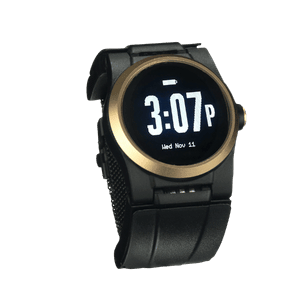
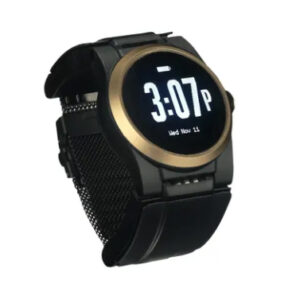
Every category above can help in the right situation. The gap this article keeps circling is the one between what a family pays for and what their parent actually wears, and that gap is where the Kanega Watch was designed.
UnaliWear’s published pricing as of August 2026 is a one-time $299 for the watch, batteries, charger, and full setup, then $84.95 a month on the monthly plan or $779.40 a year on the discounted annual plan, with a 30-day money-back trial, a $75 restocking fee on a return inside that window, and no contract. Automatic fall detection and the monitoring center are included in that price rather than added to it.
Three things shape how it fits the decisions above.
RealFall™ was trained on real falls
Most fall detection algorithms learn from staged drops in a lab, performed by young volunteers onto crash mats. RealFall™ was built on actual fall data from Kanega Watch wearers and keeps learning each wearer’s normal movement over time, so it is tuned to how older adults move and how they fall in real life.
That matters most for the slow falls: a slide down a wall, a faint, a gradual slump. Sensors calibrated to hard impacts routinely miss those. No fall detection system, including this one, catches every fall, and any accurate description has to say so.
Swappable band batteries, so it never comes off
Kanega uses batteries built into the band. A set powers the watch for 24 to 36 hours, and when it runs low the wearer swaps in the freshly charged spare set while the watch stays on the wrist. There is no nightly dock, no stretch of hours with the device on a dresser, and no forgetting.
For the parent who has already said they will not deal with charging another gadget, this removes the single most common reason these devices end up unused.
Three ways to reach a US-based Five Diamond monitoring center
Kanega gives a wearer three routes to help: press the button, speak the command, or let RealFall™ fire on its own. All three reach the same US-based, Five Diamond certified monitoring center staffed around the clock, where responders assess what is happening, reach family, and dispatch EMS. Several established providers hold that same certification, so the question to ask any shortlisted brand is not only who answers but how many ways your parent can reach them when a button press is not possible.
What This Means for Your Shortlist
Work the three decisions in order and the shortlist builds itself. If your parent leaves the house on their own, cross off every in-home-only system. If nobody in the family can reliably answer a phone within minutes at 3 a.m., cross off the unmonitored options. Then price what is left across a full year, fall detection included, and call the two survivors about activation fees, contract length, and the trial period. AARP’s guidance is to look for a free trial or the ability to cancel for any reason without penalty, and that one question sorts good providers from awkward ones fast. One filter is left, and it has nothing to do with specifications:
- Would they wear this in the shower?
- Would they wear it to bed?
- Would they wear it to lunch with friends without covering it up?
- Is it protecting them while it charges?
- Did they get a say in choosing it?
A safety plan only counts during the hours it is actually running. That is why the comfortable, unremarkable-looking device your parent forgets they have on will do more good than the feature-rich one they take off at seven every evening. Used well, a system like this is what lets someone keep living on their own terms, in their own home, with a quieter kind of confidence behind it. The Kanega Watch kit sets out what arrives in the box and what the monitoring covers, if that is the direction your shortlist points.
Some questions are easier to ask a person than a website, and there is no high-pressure sales script waiting on our end. Call 888-343-1513 or email community@unaliwear.com. Our Care and Safety Experts can walk you through plans, pricing, and whether the Kanega Watch fits your loved one’s routine.
Frequently Asked Questions
Is one of these worth it if my parent has never fallen?
Falling once is not the only trigger. The people who benefit most tend to live alone, take medications that affect balance or blood pressure, or have a condition that could put them on the floor without warning. If your parent has none of those and someone checks in daily, waiting is reasonable. A hospital stay or a new prescription is a natural moment to revisit the question.
Should we lease the equipment or buy it outright?
Leasing keeps the upfront cost near zero and lets you walk away, but the hardware goes back when you cancel and the balance may come due if you leave early. Buying costs more on day one, the device is yours if you switch monitoring companies, and it is the only route that makes a resale or a hand-me-down possible. For a first-time purchase where you are not sure it will stick, leasing usually makes more sense.
What happens if the alert goes off by accident?
Almost every system starts a short countdown, and your parent can cancel it with a button press or a spoken word. If they miss that window, a responder comes on the line, hears that everything is fine, and closes the call. AARP suggests asking each provider whether false alarms are unlimited, since not every company treats them the same way, and asking how long the cancel window runs before help is dispatched.
Does my parent need a landline?
No, though a landline is still the cheapest route. Home systems come in landline and cellular versions, and the cellular ones use the provider’s own network rather than your parent’s phone plan. If the house has weak cellular coverage, ask specifically whether the system can also connect over WiFi.
How do we cancel if it turns out to be the wrong fit?
Trial windows vary by provider, so read the policy rather than assuming every company offers 30 days. Confirm whether return shipping or a restocking fee applies and whether unused monitoring is refunded.