A medical alert device is one of the simplest ways to help an aging parent stay safe at home. The hard part is not buying one. It is figuring out which one your loved one will actually wear.
Key takeaways
- A medical alert device connects an older adult to a monitoring center or emergency contacts through a help button, voice command, or automatic fall detection.
- Monitored systems route alerts to trained agents, while unmonitored systems dial 911 or a preset contact list directly without human verification.
- Medical alert devices come in in-home, mobile GPS, pendant, wristband, and smartwatch-style formats, each suited to a different daily routine.
- Most medical alert plans cost 20 to 85 dollars per month, plus possible equipment, activation, and fall-detection add-on fees.
- Automatic fall detection shortens response time but does not catch every fall, and no device prevents falls from happening.
- Medicare and Medicaid generally do not cover medical alert devices, though FSA and HSA funds usually qualify for the purchase.
Wearable Medical Alert Devices: The Future of Senior Safety
A medical alert device is a wearable or home-based gadget that lets an older adult call for help with the press of a button, a spoken command, or an automatic alert. The signal goes to a monitoring center, a family member, or emergency services, depending on the system.
For years, that meant a plastic pendant worn around the neck. The category has changed. Today the fastest-growing options look like ordinary smartwatches, and many older adults prefer them.
That shift matters because a device only protects someone when it is on their body. The right medical alert device for seniors helps a parent keep living on their own terms with a backup plan in place.
If you are researching for a parent, you are probably not looking for the cheapest or the most feature-packed option. You are looking for the one they will keep on through the shower, the night, and the morning walk. This guide covers how these devices work, the types available, what the best ones cost, and the questions worth asking before you buy.
How Medical Alert Devices Work
Most medical alert devices follow the same three steps: the wearer signals for help, a responder answers, and help gets dispatched. The technology behind each step varies, but the flow stays consistent.
The basic chain of help
A wearer presses a help button or speaks a command. The device connects to a monitoring center, a staffed facility that receives alerts 24 hours a day and dispatches help. A trained agent talks to the wearer through the device, assesses the situation, and calls a family member or emergency services.
As AARP puts it, detecting an emergency is only the first step. What happens after the alert decides whether someone gets help in seconds or sits waiting.
Monitored vs. unmonitored systems
A monitored system routes alerts to that 24/7 monitoring center. A live agent can verify the emergency, reassure the wearer, and send the right help.
An unmonitored system skips the center and dials 911 or a preset contact list directly. It costs less per month, but no trained agent stays on the line, and no one verifies the situation if your loved one cannot speak.
What PERS means
You will see the term PERS in product listings and reviews. It stands for personal emergency response system, which is the formal name for any device that connects a person to help through a button, voice, or automatic alert.
A PERS can sit on a kitchen counter, hang from a lanyard, or wrap around a wrist. The label describes what the device does, not how it looks.
Types of Medical Alert Devices
Medical alert devices fall into two major categories, each designed for a different lifestyle, level of mobility, and type of support.
In-home systems
An in-home system uses a base station plugged in at the house, paired with a wearable button. It connects through a landline or a cellular signal and covers the home and yard.
This type suits an older adult who spends most of the day at home and rarely travels far. It usually costs the least.
Mobile systems
A mobile system is a wearable device that works anywhere with cell coverage and uses GPS to share the wearer’s location in an emergency. It travels to the grocery store, the park, and a grandchild’s house.
This type fits an active senior who drives, walks, or runs errands alone. The wearer’s location travels with them, which matters when an emergency happens away from home.
Mobile systems come in several forms, most commonly pendants, buttons, and medical alert watches. Pendants are worn on a lanyard around the neck and typically include a breakaway feature to reduce strangulation risk.
Buttons can be worn on a wristband, clipped to a belt, or carried in a pocket. Automatic fall detection is typically available only on devices worn around the neck or on the wrist.
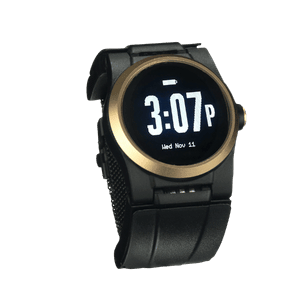
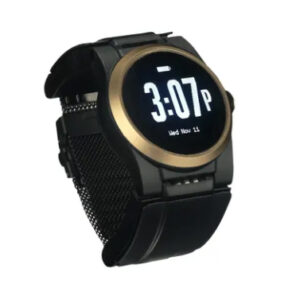
Medical alert watches are designed to look and function like a watch. They appeal to seniors who dislike the stigma of a traditional pendant. The look is the point: a device worn for style gets worn more often. Many medical alert watches resemble consumer smartwatches while providing dedicated emergency response. Some also include features such as step tracking, medication reminders, and the time, helping build a habit of wearing the device every day.

Best Medical Alert Devices for Seniors and the Elderly in 2026
No single device wins for everyone. The best medical alert device depends on whether your loved one stays home or travels, prefers a wrist or a neck, and needs fall detection. The table below summarizes leading options based on independent reviews from Wirecutter and AARP.
| Device |
Type |
Fall detection |
Monthly cost (approx.) |
Best for |
| Medical Guardian MGMini |
Mobile or in-home |
Add-on (~$10/mo) |
$29.95 to $44.95 |
Mobile or home protection |
| Bay Alarm Medical |
In-home or mobile |
Add-on (~$10/mo) |
$24.95 to $39.95 |
Budget-conscious families |
| Lively Mobile Plus |
Mobile pendant |
Included on select plans |
$24.99 to $39.99 |
Seniors looking for a simple pendant |
| Philips Lifeline |
In-home or mobile |
Included on select plans |
$29.95 to $49.95 |
A long-established brand name |
| Apple Watch |
Consumer smartwatch |
Built-in (hard falls) |
Device + cellular plan |
Tech-comfortable seniors already in the Apple ecosystem |
| UnaliWear Kanega Watch |
Medical alert watch |
Included (RealFall™ fall detection) |
$84.95 (monitoring) |
Seniors who want a watch they never remove to charge |
Pricing shifts with plans and promotions, so confirm current rates before you buy.
How the picks compare
Each device in the table is designed for a different type of user. In-home systems prioritize simple home coverage, mobile devices extend protection outside the house, and consumer smartwatches add fall detection alongside many other everyday features.
The biggest differences come down to how each device approaches emergency response. Consumer smartwatches include fall detection as one feature among many, while dedicated medical alert devices are designed specifically to connect wearers with help during an emergency. Beyond that, features such as automatic fall detection, monitoring, charging requirements, and everyday wearability often determine which device is the better fit.
Where the Kanega Watch fits
The Kanega Watch is a medical alert watch with automatic fall detection and 24/7 monitoring built in.
Unlike many providers, it includes RealFall™ automatic fall detection in the base monthly fee rather than charging extra. It is designed for seniors who want the convenience of a watch together with dedicated emergency response and a watch they don’t need to remove to charge. Those same factors (wearability, monitoring, fall detection, and ongoing cost) are also some of the most important things to compare before choosing any medical alert device.
What to Look For Before You Buy
Before you compare devices feature by feature, narrow your list to monitored systems with 24/7 response, unless your loved one specifically wants a family-only alert. From there, a short checklist keeps the decision manageable.
Will they wear it?
Start here, because nothing else matters if the device sits in a drawer. Ask whether your loved one will keep it on in the shower, where many falls happen, and to bed, since nighttime bathroom trips raise fall risk. One study found that waking to use the bathroom three or more times a night is linked to a 28 percent higher fall risk, according to research cited in senior care writer Wisniewski’s UnaliWear buyer guide.
Monitoring and response time
Confirm who answers when the alert fires. A staffed monitoring center with trained agents can assess the situation and dispatch the right help, while a direct-to-911 device skips that layer. Note that monitoring centers typically do not call 911 themselves, but rather can dispatch emergency services directly to reduce response time.
Ask any provider for their average response time in writing. Industry figures put monitoring center response around 30 to 45 seconds after an alert.
Connectivity at home and away
Mobile devices run on cellular networks, and reception can be spotty. Because about 60 percent of falls happen inside the home, look for a device that also connects through WiFi if your loved one’s house has weak coverage.
A device that loses signal in the back bedroom, basement, or garage cannot send an alert from those locations. Test coverage during the trial period.
Battery and charging gaps
Every hour a device spends on a charger is an hour without protection. Ask whether it needs a nightly dock or uses swappable batteries so the wearer stays covered while depleted batteries charge.
This is where a parent who refuses anything that needs a nightstand charger often gets stuck. A swappable-battery design removes that objection.
Fees and the trial period
Watch for activation fees, equipment fees, and fall-detection add-ons, which usually run $10 to $15 a month. Most reputable providers offer a 30-day money-back trial.
Use it. Have your loved one wear the device through a normal week and run a practice alert with the monitoring center before the trial ends.
Automatic Fall Detection: How It Works and Why It Matters
Automatic fall detection sends an alert without anyone pressing a button. That matters most in the moments a button is useless: a heart attack, a stroke, or a fall that knocks someone unconscious.
How the sensors work
A fall detection device uses an accelerometer to track sudden changes in speed and direction, often paired with a gyroscope that senses rotation. When the motion matches a fall pattern, the device starts a short countdown and then alerts the monitoring center if the wearer does not cancel it.
Falls are the leading cause of injury death among older adults, according to the Centers for Disease Control and Prevention. That is why more providers now offer fall detection as a standard or optional feature.
Why no device catches every fall
A slow slump, a faint, or a gradual slide produces less force than a hard trip, so some falls slip past the sensors. Loose clothing and improper wear cause misses too.
Treat fall detection as a strong safety layer, not a guarantee. No system on the market detects every fall, and any provider that claims otherwise is overselling.
How smarter systems learn
Some fall detection systems use artificial intelligence to cut down on false alarms. If the device flags an everyday motion as a fall by mistake, the algorithm adjusts so it stops misreading that movement.
The Kanega Watch takes this further with RealFall™, a system trained on real falls from actual wearers rather than only staged lab drops. The aim is to close the gap between how older adults really fall and what the device recognizes.
How Much Do Medical Alert Devices Cost?
Medical alert devices generally run $20 to $85 a month, plus possible one-time equipment or activation fees. Where a device lands in that range depends on monitoring, fall detection, and whether you rent or own the hardware.
Monthly and equipment costs
The monthly fee covers around-the-clock monitoring. Some providers also charge a one-time equipment fee, while others fold the hardware cost into a higher monthly rate.
When a provider charges an equipment fee, you usually own the device. When the equipment is loaned at no upfront cost, you typically return it if you cancel. Ask which arrangement applies before you sign.
The fall-detection line item
Fall detection is the cost most families overlook. Many providers add $10 to $15 a month for it, while a few, including the Kanega Watch, include it in the base fee.
Factor that add-on into your year-one math before comparing sticker prices. A cheaper monthly rate with a paid fall-detection upgrade can cost more than a higher all-in plan.
Similarly, other useful features such as medication reminders are often charged separately which can raise the monthly cost. Beware of cheap monthly teaser rates that rise substantially once all the extras are added on.
Does insurance or Medicare cover it?
Medicare and Medicaid generally do not cover medical alert devices, and most private insurance plans do not either. This catches many families by surprise, so plan to pay out of pocket.
There is one common workaround. As we explain in Does My Health Insurance Cover a Kanega Watch?, the IRS treats medical alert systems as an eligible expense under most FSA and HSA programs, which lets you use pre-tax dollars toward the cost.
Frequently Asked Questions
What is the difference between a medical alert device and a medical alert system?
In everyday use, the terms overlap. A medical alert device usually refers to the wearable itself, like a pendant or watch, while a medical alert system describes the full setup, including the device, the monitoring center, and the service plan. When you buy one, you are buying both.
Do medical alert devices work outside the home?
Mobile and GPS-enabled devices do. They use cellular networks and location tracking to send help wherever the wearer goes, as long as there is cell coverage. In-home systems, by contrast, only cover the house and the area right around it.
Can you get a medical alert device without a monthly fee?
A few unmonitored devices charge no monthly fee and dial 911 or a family member directly. The trade-off is real: no trained agent answers, no one verifies the emergency, and your loved one is on their own if they cannot speak. For someone who lives alone, a monitored plan usually offers more reliable coverage.
What makes the Kanega Watch different from other medical alert devices?
The Kanega Watch is a wrist-worn medical alert watch with automatic fall detection and 24/7 monitoring built in. Unlike many providers, it includes RealFall™ automatic fall detection in the base monthly fee rather than charging extra. It also uses swappable batteries, so the watch does not need to be removed for charging. RealFall™ is trained on real falls from actual wearers to help improve recognition of how older adults fall in everyday life. No fall detection system catches every fall, but the goal is to provide reliable protection without interrupting daily wear.
The best medical alert device for your family is the one your loved one will wear every day: in the shower, through the night, and on the walk they take each morning. As we wrote in Empowering Independence, the right tools can reduce constant worry without asking anyone to give up the life they know.
If you want to talk through your options with no high-pressure sales, call 888-343-1513 or email community@unaliwear.com. Our Care and Safety Experts can walk you through plans, pricing, and whether the Kanega Watch fits your loved one’s routine.
Extending independence with dignity.