Your mom still drives to the farmers market on Saturdays. Your dad walks the dog before breakfast and flies out to see the grandkids twice a year. For an active parent, the safety question was never about slowing down. It is whether help can reach them anywhere their day takes them.
Key takeaways
- Mobile medical alert systems for active seniors connect through cellular and GPS networks, so help reaches the wearer outside the home.
- In-home medical alert systems reach only a few hundred feet from the base station, leaving stores, trails, and parking lots uncovered.
- GPS medical alert devices share the wearer’s location with a monitoring center, helping responders reach an active senior away from home.
- Automatic fall detection alerts help without a button press, though no system detects every fall, so other safety steps stay necessary.
- Devices that require daily charging create coverage gaps, because an active senior is often away from the charger during outings.
- A medical alert device protects an active senior only while worn, so comfort and discreet design drive consistent daily use.
- Falls remain the leading cause of injury for adults 65 and older, and about one in four older adults falls each year (CDC).
Why Active Seniors Need a Different Kind of Protection
An active senior needs protection that travels, because their risk travels with them. The old picture of a medical alert, a button by the recliner, was built for someone who rarely leaves the house. Your parent is not that person.
Falls don’t only happen at home
An active routine lowers fall risk, but it does not remove it. The Centers for Disease Control and Prevention still ranks falls as the top cause of injury for adults 65 and older, with one in four falling in a given year.
For someone always on the move, those falls scatter across the places a busy week takes them. A curb at the farmers market. A wet tile by the pool. A loose rug at a friend’s house. The more your parent moves through the world, the more places a stumble can find them.
Staying active, whether that is a morning walk or laps around the mall, is good for balance, strength, and mood. It does not make anyone fall-proof. The point of protection is not to keep your parent home. It is to follow them out the door.
What “active” really means for a safety plan
For a safety plan, “active” means your parent regularly leaves the range of a home base station. They garden, travel, run errands, and exercise.
That single fact rules out a whole category of devices. A system that only works inside the house protects the smallest part of their week.
For an active senior, protection that stops at the front door is protection that misses most of the day.

How Traditional Medical Alert Systems Fail Active Lifestyles
Traditional in-home systems fail active seniors in three predictable ways: limited range, charging gaps, and a design built to be hidden. Each one turns into a real moment when help should have been there and was not.
The in-home base station stops at the front door
A classic medical alert uses a base station plugged into the wall. The wearable button talks to that base over a short radio range, usually a few hundred feet.
Step into the driveway and the coverage thins. Drive to the store and it disappears. Picture your dad on his morning walk, three blocks from home, when his knee buckles on an uneven sidewalk. The button on his neck has nothing to connect to.
Daily charging leaves gaps when you’re out
Most alert watches and many mobile pendants need a daily charge. That means an hour or more, every day, when the device sits on a nightstand instead of on a wrist.
Active seniors are the people most likely to be away from the charger when something happens. The walk, the errand, the trip to the lake all happen during the hours the battery is meant to last. A device that has to come off to power up creates a daily window with no coverage.
The pendant nobody wants to wear
A device only helps if your parent actually wears it. A bulky pendant that announces “I had to get one of these” tends to end up in a drawer.
This is not vanity. It is dignity. Independence research from AARP frames medical alerts as tools that support an older adult’s autonomy, not signals that the autonomy is gone. A device that respects how your parent sees themselves is a device they will keep on.
What Active Seniors Actually Need from a Medical Alert Device
Active seniors need a wearable that works outside the home, stays on the body, and looks like something they would choose on their own. The feature list flows from one rule: protection only counts when the device is worn and connected.
A wearability checklist
Senior care and health writer Jenny Wisniewski’s medical alert buyer guide puts wearability first for a reason: a device only protects when it is actually worn. Use this list to weigh any device against your parent’s real routine. It is a starting point, not pressure or perfection.
- ☐ GPS location, so responders can find them on a trail or in a parking lot
- ☐ Works on cellular and WiFi, not just a home base station
- ☐ Water resistant for the shower, where many falls happen
- ☐ All-day battery with no daily remove-to-charge gap
- ☐ Automatic fall detection that calls for help without a button press
- ☐ Lightweight and comfortable for all-day wear
- ☐ A look your parent is glad to wear in public
Questions to ask before you buy
Ask yourself whether the device still protects your parent when they are not home. If the answer is no, the rest of the spec sheet does not matter for an active life.
Then ask who answers the call. A device that dials only a family phone depends on someone picking up. A monitored system routes the alert to a staffed monitoring center, a 24/7 facility that assesses the situation and dispatches help.
Linda Schlenker, an occupational therapist quoted by SeniorLiving.org, describes medical alert systems as “a critical component of general home safety.” The right fit comes from matching the device to how a person actually lives, not from buying the longest feature list.
The Difference Between In-Home and Mobile Medical Alert Protection
In-home systems protect the person only when they are at home Mobile systems protect the person everywhere life takes them. That simple difference often determines which type is the better fit for an active senior.
What a mobile medical alert system is
A mobile medical alert system is a wearable device that connects to help through a cellular network instead of a home base station. Because it carries its own connection, it works at the store, on a walk, or out of town, anywhere there is coverage.
Many mobile medical alert systems add GPS support for location sharing, so a monitoring center or family member can see where your parent is when an alert fires. That location data is what turns an alert into a fast response when your parent is away from home.
The most advanced systems also support home WiFi connections to the monitoring center, so they work in homes with weak cellular signals, whether that is due to how the building was constructed (thick walls, basements, etc.) or being located in areas with poor cellular network coverage.
In-home vs. mobile, side by side
| Feature |
In-home system |
Mobile / GPS device |
| Works outside the home |
No |
Yes |
| GPS location |
No |
Yes |
| Connection |
Home base station |
Cellular + GPS; sometimes WiFi |
| Charging |
Base stays plugged in; on-person device charged every few days or weekly |
Often daily charge |
| Worn in public comfortably |
Pendant, wrist strap, or belt clip |
Pendant, wrist strap, belt clip, or watch |
| Best for |
Mostly at-home routines |
Active, all-day wear inside and outside of the home |
In-home systems still serve people who rarely leave the house. For a parent who drives, walks, and travels, a mobile or watch-based device covers the parts of life an in-home unit cannot reach.
How the Kanega Watch Works for Seniors Who Are Always on the Go
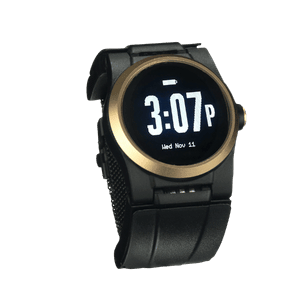
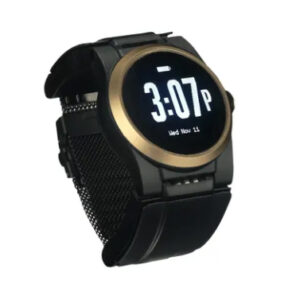
The Kanega Watch was built for the parent who is not ready to sit still. It puts mobile protection in a watch your parent can wear to dinner, on the trail, and in the shower. Three things make it fit an active life.
It never comes off to charge
The Kanega Watch uses swappable batteries in the band. When they run low, your parent slides in charged spares and the watch keeps working. There is no nightly dock, and no hour on the nightstand when a fall could happen.
For an active senior, that closes the exact gap other watches leave open: the time they are away from the charger and out in the world.
GPS and automatic network switching
The watch connects through cellular, WiFi, and GPS, and it switches between them on its own. At home it can use WiFi. On a walk it uses cellular and GPS so responders know where to go.
If your dad falls on a trail two miles from the car, the monitoring center can locate him. That is the difference between a quick response and a long wait.
RealFall™ when help is far away
RealFall™ is UnaliWear’s automatic fall detection, trained on real falls from actual wearers rather than only lab simulations. When it detects a fall, it connects your parent to a US-based monitoring center staffed around the clock. No system catches every fall, so treat fall detection as a strong safety layer alongside regular check-ins.
The best medical alert system for an active senior is the one they will wear on the walk they take every morning, on the trip they have been planning for months, and in the shower where so many falls happen. As we wrote in Empowering Independence, the right device works like an invisible safety net that protects freedom instead of limiting it. The goal is not to shrink their world. It is to make sure help can find them anywhere in it.
If you want to talk through options with no high-pressure sales, call 888-343-1513 or email community@unaliwear.com. Our Care and Safety Experts can walk you through plans, pricing, and whether the Kanega Watch fits your parent’s routine. That kind of backup can give your whole family more peace of mind without asking anyone to give up the life they love.
Extending independence with dignity.