If you are researching fall detection devices for a parent, you probably already know why this matters. You want your loved one to stay independent without carrying the weight of every unanswered phone call.
Key takeaways
- A fall detection device can only protect when it is worn.
- Fall detection devices use motion sensors to recognize a fall and send an alert automatically without the wearer pressing a button.
- Automatic fall detection shortens the time between a fall and a response but cannot prevent falls or catch every fall.
- Monitored systems route alerts to a 24/7 staffed monitoring center, while unmonitored devices call 911 or a preset contact directly.
- Most providers charge about $10 per month extra for automatic fall detection, while the Kanega Watch includes fall detection in its monitoring fee.
- NCOA’s 2026 testing measured fall-detection response times of roughly 48 to 62 seconds across the medical alert systems reviewed.
- Apple Watch fall detection calls 911 directly, while dedicated medical alert devices connect to trained monitoring agents who dispatch help.
- Life Alert does not offer automatic fall detection, so the wearer must press a button to call for help.
Why Fall Detection Matters for Families
Falls are the leading cause of injury among adults 65 and older, according to the Centers for Disease Control and Prevention. About one in four older adults falls each year. Many of those falls happen at home, where no one is around to hear a call for help.
The long lie problem
When an older adult falls and cannot get up, every minute on the floor counts. Geriatricians call this a long lie: time spent unable to move before help arrives. The National Council on Aging notes that falls are common and largely preventable, which is why the minutes right after a fall matter so much.
Dr. Warren Wong, a geriatrician in Honolulu, told AARP that the last thing you want is an older person left on the floor for an extended period, where a recoverable fall can lead to serious complications like rhabdomyolysis, a life-threatening breakdown of muscle tissue.
You cannot be in the room every hour. Fall detection devices that call family or connect to a monitoring center give your loved one a way to reach help when they cannot reach the phone.
What a fall detection device actually does
A fall detection device is a wearable or home-based sensor that uses motion data to recognize a fall and send an alert automatically. The alert may go to a 24/7 monitoring center, a family member’s phone, or emergency services, depending on the system.
Fall detection devices for seniors work best as part of a broader safety plan. They do not prevent falls. They shorten the time between a fall and a response. Our fall prevention checklist for families covers home modifications that pair well with wearable alerts.
Why families start looking now
Most families begin this search after a close call: a stumble on the stairs, a fall in the bathroom, or a parent who stopped mentioning minor injuries. That timing is normal. Starting the conversation before a serious injury gives you and your loved one room to choose a device they will actually wear.
AARP frames medical alert systems as tools that support independence for older adults and reassurance for family caregivers. The goal is to keep your parent living on their own terms with a backup plan in place.
Researching fall detection devices can feel like one more task on an already full plate. You are allowed to move at your own pace. Include your parent in the decision when you can. A device they help choose is a device they are more likely to wear.
How Fall Detection Technology Actually Works
Fall detection wearable devices use sensors inside a pendant, wristband, or watch to measure sudden changes in movement, orientation, and sometimes air pressure. When the device registers a pattern that matches a fall, it triggers an alert without the wearer pressing a button.
What is a PERS?
A personal emergency response system (PERS) connects the wearer to help through a help button, voice command, or automatic fall detection. Monitored PERS devices route alerts to a staffed monitoring center. Unmonitored devices may call 911 or a preset contact list directly.
Most fall detection devices for elderly users that families trust for daily wear are monitored systems with two-way talk and GPS on mobile models.
Hard falls vs. soft falls
Not every fall looks the same to a sensor.
A hard fall involves a sudden impact: tripping on a curb, slipping on ice, or losing balance on stairs. Accelerometers pick these up reliably.
A soft fall is slower: sliding down a wall, fainting from low blood pressure, or gradually slumping into a chair. These produce less force. Many consumer smartwatches miss them. Dedicated medical alert hardware and newer AI-based systems generally perform better on slow falls, though no device catches every type.
How sensors and algorithms work together
Most fall detection wearable devices combine an accelerometer (tracks speed and direction of movement) with a gyroscope (tracks rotation). Some add a barometer to detect small altitude changes when someone drops to the floor.
The device’s software compares incoming data against fall profiles. If the pattern crosses a threshold, the device starts a countdown. During that window, the wearer can cancel a false alarm before the alert is sent. Some systems let users adjust the length of this countdown, trading a faster response for more time to cancel accidental alerts.
Some systems use machine learning to improve over time. Besides reducing false alarms, developers can refine detection models as more real-world fall data becomes available, helping improve recognition of actual falls.
False positives and false negatives
A false alarm (sometimes called a false positive) means the device sent an alert even though no fall occurred. Quick movements, dropping the device, or riding in a bumpy car can sometimes trigger these.
A missed fall (sometimes called a false negative) means a real fall happened but the device did not send an alert. Loose clothing, improper wear, or a very slow slump can cause misses.
Higher sensitivity settings may detect more real falls, but they can also increase false alarms. Lower sensitivity settings reduce false alarms but may miss some falls. Some devices let wearers adjust this balance to match their lifestyle and preferences.
Important: No fall detection system detects every fall. Even the best fall detection devices on the market cannot guarantee a response to every incident. Treat fall detection as a strong safety layer, not a replacement for regular check-ins, home safety improvements, and medical follow-up.
What this means for your family
When you evaluate fall detection devices that call family or a monitoring center, ask how the provider handles false alarms and missed falls. A system that cries wolf too often may end up unworn. A system that misses real falls defeats the purpose. Independent review sites such as Wirecutter evaluate false alarms and missed falls when reviewing medical alert systems.
Top Fall Detection Devices Reviewed and Compared
Fall detection devices for seniors fall into three broad categories: neck pendants, wrist-worn medical alerts, and consumer smartwatches with fall detection added. Each category trades off comfort, accuracy, and who receives the alert.
The table below summarizes leading options based on independent reviews from NCOA’s fall detection roundup, Wirecutter’s medical alert testing, and AARP’s medical alert guide. Pricing changes by plan and promotion. Confirm current rates before you buy.
| Device |
Type |
Fall detection |
Monthly cost (approx.) |
Response |
Best for |
| Kanega Watch |
Medical alert watch |
Included (RealFall™ fall detection) |
$84.95 ($64.95 if paid annually) |
Monitoring center |
Seniors who want a watch they never remove to charge |
| Medical Guardian MGMini |
Mobile pendant |
Add-on (~$10/mo) |
$39.95 to $44.95 + add-ons |
Monitoring center |
Families wanting a tested pendant with GPS |
| Bay Alarm Medical SOS Smartwatch |
Wrist watch |
Add-on (~$10/mo) |
$39.95 + add-ons |
Monitoring center |
Budget-conscious wrist-worn option for users comfortable with daily charging |
| Lifeline On the Go |
Mobile pendant |
Add-on ($15/mo) |
$44.95–$49.95/month + setup fee + optional fall detection |
Monitoring center |
Established brand, long track record |
| Apple Watch (SE, Series 4 and later) |
Consumer smartwatch |
Built-in (hard falls) |
Device + cellular plan |
Calls emergency services and can notify emergency contacts |
Tech-comfortable seniors already wearing one |
| Life Alert |
Pendant or wristband |
Not available (button press only) |
$49.95 to $89.95 |
Monitoring center |
Name recognition, long-standing service |
Medical Guardian Mini Guardian
The Mini Guardian is a lightweight mobile pendant with GPS, two-way voice, and optional automatic fall detection. NCOA testers reported strong accuracy in simulated fall tests, though fall detection costs extra on most plans.
Best for: Older adults comfortable wearing a pendant outside their clothing in public.
Limitation: Fall detection accuracy drops if the pendant is tucked under a coat or swings against furniture without free movement.
Bay Alarm Medical SOS Smartwatch
Bay Alarm Medical’s smartwatch-style alert offers a lower monthly entry point than many premium watches. Fall detection is available as an add-on, similar to most pendant competitors.
Best for: Families comparing wrist-worn fall detection wearable devices on a tighter monthly budget.
Limitation: You still remove the watch to charge, which creates gaps in protection overnight and during showers if the device is off the wrist. In addition, the touch screen and small icons can be challenging for some seniors, particularly those with vision or hand mobility challenges.
Lifeline On the Go
Lifeline is one of the oldest and most established names in medical alert systems. The On the Go is a GPS-enabled mobile pendant with optional automatic fall detection and access to Lifeline’s 24/7 monitoring center.
Best for: Families who prioritize brand longevity and a pendant form factor.
Limitation: Monthly costs run higher than some newer competitors, and the medical aesthetic may discourage daily wear for style-conscious seniors.
Apple Watch
Apple Watch fall detection targets sudden, hard impacts. If the watch detects a hard fall while worn, it taps the wrist, starts a countdown, and can call emergency services. Apple documents that the feature works best during high-impact falls.
Best for: Tech-savvy active older adults already committed to the Apple ecosystem.
Limitation: Apple Watch can contact emergency services and notify emergency contacts, but it does not connect to a dedicated medical monitoring center. It also requires an iPhone, and a cellular plan may be necessary if the wearer needs emergency calling away from their phone. Wirecutter and NCOA both note that consumer smartwatches are not substitutes for dedicated PERS devices when fall detection and life safety are the primary concerns.
Life Alert
Life Alert remains one of the most recognized names in the category, with pendant and wrist options and a long-running monitoring operation. One important gap: independent reviewers (including NCOA and SeniorLiving.org) note that Life Alert does not offer automatic fall detection, so the wearer must press the button to call for help.
Best for: Families who want a familiar brand and phone-based sales support.
Limitation: No automatic fall detection, published pricing sits at the higher end of the market, and notoriously rigid contract terms. Call for a written quote before you commit.
Kanega Watch
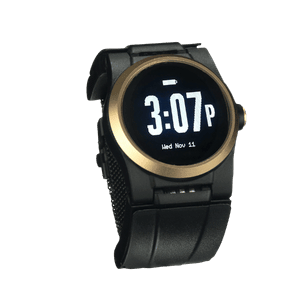
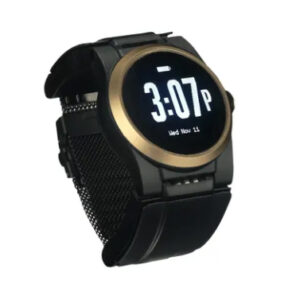
The Kanega Watch is a medical alert watch with built-in RealFall™ fall detection, 24/7 monitoring, GPS location services, and a battery-swapping design that allows users to keep the watch on while changing batteries. Unlike many competitors, fall detection is included in the monitoring fee rather than offered as a paid add-on.
Best for: Seniors who want continuous protection from a watch they never need to remove to charge, with fall detection included at no extra cost.
Limitation: It has a higher monthly monitoring cost than some competitors, although fall detection is included rather than charged as an add-on. When comparison shopping, be sure to compare against the final price of other devices after all important add-ons are included, such as fall detection and medication reminders.
What to Look For Before You Buy
Medical alert systems come in many configurations. Before you compare fall detection devices for elderly parents, narrow your list to monitored systems with 24/7 response unless your loved one specifically wants a family-only alert.
Wearability questions
A fall detection device only works when it is on the body. Ask:
- Will your loved one wear it in the shower? Waterproof protection matters because bathroom falls are common.
- Will they wear it to bed? Nighttime trips to the bathroom carry higher fall risk.
- Does the form factor fit their style? Some seniors accept a watch more readily than a pendant worn outside clothing.
Senior care and medical technology writer Jenny Wisniewski’s medical alert buyer guide puts wearability first for a reason: consistency beats features every time.
Monitoring and response
Confirm who answers when the alert fires. A staffed monitoring center with trained agents can assess the situation, call family, and dispatch EMS. Direct-to-911 systems skip that layer.
Ask any provider how long it typically takes for a monitoring agent to respond to an alert, and request average response times in writing if they’re available.
Fall detection and other monthly fees
Many medical alert providers advertise a low starting monthly price, but optional features can significantly increase the total cost. Automatic fall detection often adds $10 to $15 per month, and other services such as medication reminders or caregiver features may cost extra as well.
A smaller group, including the Kanega Watch, includes fall detection in the base monitoring fee. Before comparing prices, check what is included in the monthly fee and what requires an additional subscription. A plan that appears less expensive at first may end up costing substantially more once the features your loved one needs are added.
Connectivity at home and away
Mobile fall detection devices run on cellular networks. Because many falls happen at home, where cellular service can be weak, look for a device that also connects through WiFi so a poor signal does not delay an alert.
Battery and charging gaps
Every hour the device spends off the wrist or on a charger is an hour without protection. Ask whether the device requires nightly charging or supports swappable batteries so the wearer stays covered.
Trial period and cancellation
Most reputable providers offer a 30-day trial. Use it. Have your loved one wear the device through a normal week: errands, exercise, bathing, sleep. Test the help button and ask the monitoring center to run a practice alert.
Call customer service with specific questions before you buy. NCOA and AARP both recommend talking to a live representative about activation fees, equipment ownership, and contract length.
Fall detection devices that call family
Some families ask about fall detection devices that call family directly instead of routing through a monitoring center. A few apps and unmonitored wearables offer this setup at a lower monthly cost. The trade-off: no trained agent on the line to assess the situation, verify a false alarm, or dispatch EMS with medical history on file.
If your loved one lives alone and you cannot always answer the phone within minutes 24 hours a day, seven days a week, a monitored system with fall detection provides more reliable coverage than a family-only alert chain.
Why the Kanega Watch Stands Apart From Every Other Device on This List
Every device above can help in the right situation. After comparing fall detection devices across form factors, price tiers, and independent test results, three differences separate the Kanega Watch from the rest of this list.
RealFall™ fall detection, trained on real falls
Most fall detection algorithms learn from lab simulations: researchers strap sensors to young volunteers and stage controlled falls. UnaliWear’s RealFall™ fall detection was trained on actual falls from real Kanega Watch wearers so the system recognizes the movement patterns of older adults in everyday life.
No system catches every fall. RealFall™ is built to reduce the gap between how seniors actually fall and what the software recognizes. As additional real-world fall data is collected, UnaliWear continues refining the detection model to improve recognition of genuine falls over time.
The Kanega Watch’s fall detection sensitivity is adjustable, which allows wearers to choose a sensitivity range that best matches their lifestyle.Wearers can also choose a shorter or longer alert delay, balancing faster emergency response with more time to cancel accidental alerts.
Never remove to charge
The Kanega Watch uses swappable batteries in the band. Once a day, the wearer swaps in a fresh set of batteries without taking the watch off. Most competing watches and pendants require daily or weekly charging sessions that leave the user unprotected.
For a parent who has said they will not wear anything that needs a nightly dock on the nightstand, this removes one of the most common reasons devices end up in a drawer.
Five Diamond monitoring center, not just a phone tree
When RealFall™ triggers an alert or your loved one presses the button or speaks the voice command, the call goes to a US-based, Five Diamond certified monitoring center staffed 24/7. Agents assess the situation, contact family if needed, and dispatch emergency services with the wearer’s location. Oftentimes, a family member can assist with minor emergencies, thereby avoiding a potentially embarrassing ambulance visit to the home. Finally, monitoring center agents can provide emergency responders with important health information about the wearer such as drug allergies, as well as gate codes, door codes, and hidden key locations so first responders can access the wearer’s home quickly and without damaging doors.
Consumer smartwatches on this list connect to 911. While 911 can get help in emergencies, they are limited to dispatching emergency services.
The best fall detection device for your family is the one your loved one will wear every day: in the shower, through the night, and on the walk they take every morning. As we wrote in Empowering Independence, fall detection works best as an invisible safety net that protects freedom rather than limiting it. Tools that provide reassurance can help reduce constant worry without asking anyone to give up the life they know.
If you want to talk through options with no high-pressure sales, call 888-343-1513 or email community@unaliwear.com. Our Care and Safety Experts can walk you through plans, pricing, and whether the Kanega Watch fits your loved one’s routine.
Extending independence with dignity.