Falls are the leading cause of injury-related death among older adults, and the window between a fall and getting help determines the outcome. In this guide, you’ll find a breakdown of every major device type, the features that separate reliable protection from false assurance, and a clear framework for matching the right fall alert device to your actual life.
What Is a Fall Alert Device and Who Needs It?
A fall alert device continuously monitors your movements, detects when you’ve fallen, and connects you to a response center that dispatches help. Many modern devices combine accelerometer sensors with GPS tracking and two-way voice communication, creating a direct line to trained responders, whether you’re at home or out.
Fall alert devices for seniors get most of the attention, but the population that benefits is broader. People managing Parkinson’s, multiple sclerosis, or peripheral neuropathy face real fall risks at any age. Anyone recovering from joint replacement surgery needs dependable coverage during a vulnerable recovery window. Adults living alone carry a specific kind of risk: a fall without immediate detection can turn a manageable injury into a life-threatening situation.
Elderly fall alert devices also serve family members. When a parent or spouse wears one, caregivers gain around-the-clock reassurance without being physically present.
Types of Fall Alert Devices
Not all fall alert devices work the same way, and the format you choose determines where and how reliably you’re covered.
Wristbands
Dedicated wrist-worn devices are simple and purpose-built for safety. Most include a manual alert button that connects to a base station in the home. Many lack GPS, which limits their practical coverage to the home.
Pendant and Button Devices
Pendant devices are among the most affordable fall alert devices for seniors, activated by pressing a button worn around the neck. Automatic fall detection is usually a paid add-on, and many systems require the pendant to be worn outside clothing for accurate detection. Consistent wearing is a genuine challenge: wearers often skip them due to discomfort, or because wearing a visible medical device around the neck carries a stigma many people find hard to accept.
Smartwatch-Style Devices
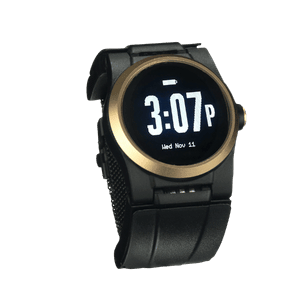
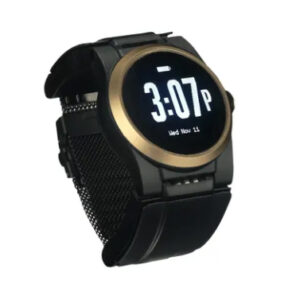
Medical alert devices with fall detection in a smartwatch format deliver the most complete picture. They combine automatic detection, GPS tracking, and two-way voice communication in a design that people actually want to keep on.
In-Home Sensors
Passive motion and pressure sensors mounted around the home detect falls without requiring any body-worn devices. Coverage ends at the front door, which makes them a limited option for anyone with an active daily routine.

Key Features to Compare
Shopping for medical alert devices with fall detection means looking past marketing claims and into actual mechanics. The specs below determine real-world reliability.
- Fall detection algorithm: The best systems train on real fall data and adapt continuously to each wearer’s movements, reducing false alarms without missing genuine falls.
- Cellular-enabled GPS: Cellular GPS devices follow the wearer anywhere on a cellular network. The best elderly fall alert devices in this category also connect via home Wi-Fi, filling coverage gaps where indoor cellular signals weaken.
- Two-way voice communication: A built-in speaker and microphone let the wearer speak directly to an agent. Voice activation adds a layer of coverage for wearers who fall and are unable to push the help button.
- Water resistance: IP67-rated protection covers showers and hand-washing. A device that comes off for daily tasks creates a frequent window of vulnerability.
- Battery and charging method: Removing wearable devices to charge creates dangerous coverage gaps. Many people recharge their devices at night, making trips to the bathroom risky. Swappable battery systems allow around-the-clock wear without removing the device.
- Monitoring response time: Seconds matter. A US-based monitoring center with full wearer profile access dispatches help faster than 911 or a general call center working from a name and a number.
- Cellular independence: Fall alert devices that depend on a paired smartphone or landline introduce failure points. Standalone cellular removes that dependency entirely.
Does Medicare cover fall alert devices?
Standard Medicare Parts A and B don’t cover medical alert systems. Some Medicare Advantage plans include an allowance for fall alert devices for seniors, so reviewing your specific plan benefits before purchasing is worthwhile.
How to Choose the Right Device for Your Lifestyle
The right fall alert device fits your actual daily pattern, and you have to be willing to wear it consistently. A device with every feature on the list delivers no protection sitting on a nightstand. Start with where you spend your time, how you move through the day, and honestly, whether the form factor is something you’d keep on.
Active Seniors and Frequent Travelers
Outdoor activity and travel demand cellular coverage that doesn’t depend on proximity to a base station. Elderly fall alert devices with built-in LTE and GPS follow the wearer across state lines without setup or pairing. Automatic fall detection is more important here, since traveling in unfamiliar places or on rougher terrain increases fall risk.
Homebound Users
For someone who rarely leaves the house, consistent indoor coverage takes priority. A device that switches to Wi-Fi inside the home resolves the dead zone problem that cellular-only fall alert devices for seniors encounter in bathrooms and other interior rooms.
People with Cognitive Decline
For people in the early to moderate stages of cognitive decline, simplicity determines whether a device is actually worn. Voice-activated alerts require no button memory, and a device that arrives pre-configured removes setup confusion entirely.
Advanced cognitive decline is a different situation. At that stage, passive systems like floor sensors or camera-based monitoring tend to be more reliable than wearables, since consistent device use becomes harder to maintain. For families navigating that transition, a fall alert device can extend safe, independent living, but there’s a point at which memory care or assisted living provides a level of supervision that no wearable can replicate.
Caregiver Considerations
Family members want confirmation that the device will stay on. A swappable battery system that eliminates nightly removal gives caregivers confidence that coverage holds through the overnight hours when falls most often go undetected.
Why the UnaliWear Kanega Watch Stands Apart
The Kanega Watch addresses all scenarios described above in a single wearable device. Swappable batteries keep it on your wrist around the clock. Voice activation works when hands won’t. Built-in Verizon LTE and automatic Wi-Fi switching deliver reliable coverage indoors and nationwide without pairing to a phone. RealFall™ technology trains on actual fall data, continuously sharpening accuracy for each wearer. It arrives pre-configured and ready to wear, in a design that carries no trace of a medical device.