If you live across town or across the country from your parent, you already know the quiet worry that comes with distance. GPS medical alert systems exist for the moments you cannot be there, so help can find your loved one wherever they are.
Key takeaways
- A GPS medical alert system combines location sharing with a 24/7 monitoring center that dispatches help during an emergency.
- GPS uses satellites to locate a device outdoors, while WiFi estimates position indoors where satellite signals weaken.
- Cellular and WiFi networks carry the emergency call to the monitoring center, so the device needs network coverage to send an alert.
- A GPS medical alert differs from a GPS tracker by adding two-way voice and emergency response, not just a map location.
- Medical alert systems with GPS and fall detection can call for help when a senior cannot press the help button.
- The Kanega Watch includes GPS and automatic fall detection and switches between WiFi and cellular networks to hold a connection.
- Battery life on GPS medical alert devices ranges from one day to several days depending on the model and settings.
Why GPS Changes Everything in a Medical Emergency
Your parent is not sitting in a chair all day. They drive to appointments, walk the dog, garden, and meet friends for lunch. An in-home medical alert system cannot help if they fall in a parking lot or feel faint on a trail two miles from the house.
That gap is the reason GPS medical alert systems for seniors exist. A traditional base unit only covers the home. A mobile device goes where your loved one goes.
The long-distance caregiving gap
Many adult children wish they could check in more often, but work, family, and geography do not always allow daily visits. That distance can bring worry and guilt.
A GPS medical alert does not close the miles between you. It does something more useful in an emergency: it tells responders exactly where your parent is when they call for help, or when fall detection calls for them.
Freedom, not surveillance
Some families hesitate because tracking sounds like control. It is the opposite. When seniors feel supported rather than monitored, a safety net becomes freeing.
Knowing help can reach them anywhere is what allows an older adult to keep driving, traveling, and living on their own terms. We wrote about this balance in Love, Connection, and Safety: true care is not hovering, it is creating room for everyone to breathe easier.
How GPS Tracking Works in Medical Alert Devices
A GPS medical alert system is a mobile device that combines emergency response with location sharing. When your loved one presses the help button or fall detection triggers, a monitoring center receives the alert along with the device’s location.
GPS, short for Global Positioning System, is a satellite network that pinpoints where a device is on a map. The wearable listens for signals from those satellites and calculates its position.
What happens during an alert
The sequence is simple from your parent’s side and fast on the back end.
- Your loved one presses the button, speaks a command, or fall detection activates automatically.
- The device connects to a 24/7 monitoring center over a cellular network.
- The system shares the current GPS location with the trained agent on the line.
- The agent talks to your parent, assesses the situation, and dispatches help or calls family.
GPS medical alert vs. a GPS tracker
These two products sound alike and do very different jobs. A plain GPS tracker shows a location on an app and stops there. A GPS medical alert adds the part that matters in a crisis: a live person who can respond.
| Feature |
GPS medical alert |
GPS tracker |
| Shares location |
Yes |
Yes |
| Two-way voice with a person |
Yes |
No |
| 24/7 monitoring center |
Yes |
No |
| Fall detection (most models) |
Yes |
No |
If your goal is help in an emergency and not just a dot on a map, you want a medical alert with GPS, not a tracker.

The Difference Between WiFi, Cellular, and GPS Location: What Families Need to Know
Most caregivers are not network engineers, and you do not need to be. Three technologies work together to find your loved one, and each has a job. Here is the plain-English version.
GPS finds the location
GPS tells the device where it is using satellites. It works best outdoors with a clear view of the sky. In locations with restricted views such as the tall buildings found in major cities, satellite signals weaken and GPS accuracy suffers. Inside, or in outdoor areas that are fully covered such as parking garages, GPS cannot determine a location at all.
Cellular carries the call from anywhere
Cellular is the same mobile network your phone uses to make calls and use data. A mobile medical alert uses it to reach the monitoring center anywhere with coverage. Where mobile coverage is weak, a cellular-only device can struggle to connect.
WiFi determines indoor location and can also carry emergency calls
WiFi is used to estimate indoor position, where satellite signals struggle. WiFi location technology works anywhere there are multiple WiFi networks visible to the device, which is common except in rural areas. The National Council on Aging lists hazards in the home among the common causes of falls, so reliable indoor location technology is not a minor detail.
In addition to using WiFi to determine location, some devices also use WiFi to reach the monitoring center when cellular signal are weak. Many homes have rooms such as basements or internal bathrooms where cell phones do not work well. GPS medical alert devices relying only on cellular service will also struggle to work properly in those same locations. WiFi enabled devices provide another layer of reliability during an emergency.
The strongest GPS medical alert systems use all three: GPS for outdoor location, cellular for coverage on the go, and WiFi to fill in indoors. A device that depends on only one can leave gaps exactly where your loved one spends the most time.
How the Kanega Watch Handles GPS and Automatic Network Switching
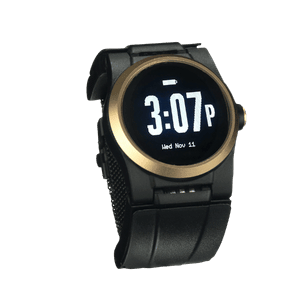
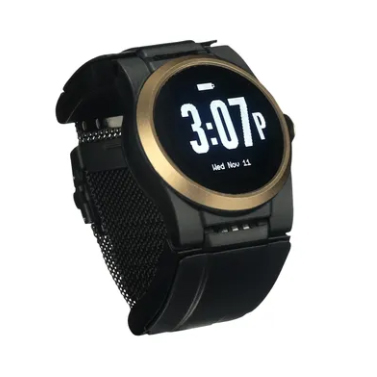
The Kanega Watch is a wrist-worn medical watch with GPS and fall detection built in. It is designed for active older adults who want protection at home and on the go, without a pendant or a separate phone to carry.
GPS and fall detection in one device
A medical alert with GPS and fall detection covers two scenarios at once. If your parent falls and cannot reach the button, RealFall™ automatic fall detection can place the call for them. The watch then shares its location with the monitoring center so responders know where to go.
RealFall™ was trained on real falls from actual wearers, not simulated falls in lab simulations. No system catches every fall, so treat it as a strong safety layer rather than a guarantee.
Automatic network switching
Coverage is not the same on every street or inside every building. The Kanega Watch checks for the best available connection and switches between WiFi and cellular networks on its own, so your loved one does not have to think about signal strength.
That matters most in the moment of an emergency, when the device needs to reach the monitoring center on the first try. The New York Times Wirecutter has reviewed the Kanega Watch For Four Consecutive Years.
A watch you never remove to charge
A GPS medical alert watch only protects your loved one when it is on the wrist. Many devices need a nightly charge on a dock, which leaves a gap overnight.
The Kanega Watch uses swappable batteries. When they run low, your parent slides in a charged spares and keeps wearing the watch with no gaps in coverage. They also never have to remember to put the watch on since it never leaves their wrists. For families whose loved one refuses anything that lives on the nightstand, that removes a common reason devices end up in a drawer.
What to Look For in a GPS Medical Alert System Before You Buy
GPS medical alert systems vary widely in coverage, battery life, and who answers when the alert fires. Use these questions to narrow your list before you compare prices.
Coverage and connectivity
Ask which networks the device uses and whether it switches automatically. A device tied to one carrier may have dead zones near your parent’s home or favorite routes. Confirm coverage at the addresses your loved one visits most.
Monitoring versus location only
Confirm that the system connects to a staffed monitoring center, not just an app on your phone. A trained agent can assess the situation, share medical history, and dispatch emergency services. That live response is one of the biggest differences between a medical alert system and a GPS tracker.
Battery life and charging
Battery life ranges from a single day to several days, and some devices avoid charging gaps with swappable batteries. Ask how long a charge lasts and what happens to protection while the device charges.
Fall detection
Many mobile systems offer automatic fall detection, sometimes for an extra monthly fee. If your loved one lives alone, a medical alert with GPS and fall detection adds a second way for help to find them when they cannot press a button.
Wearability and trial period
The best device is the one your parent will actually wear every day. This medical alert buyer guide puts wearability first for a simple reason: a watch worn through errands and sleep provides more protection than a feature-packed device left charging on a shelf.
Most reputable providers offer a 30-day trial, so have your loved one wear the device through a normal week before you commit.
A GPS medical alert system will not shrink the distance between you and your parent. It does mean that distance no longer has to leave them facing an emergency alone. As we wrote in Empowering Independence, the right safety tools work as an invisible safety net that protects freedom rather than limiting it.
If you want to talk through GPS options with no high-pressure sales, call 888-343-1513 or email community@unaliwear.com. Our Care and Safety Experts can walk you through coverage, fall detection, and whether the Kanega Watch fits your loved one’s routine.
Extending independence with dignity.