With dozens of models on the market, here is how to sort the features that matter from the ones that just sound good.
Medical alert systems come in lots of different flavors. Some connect you to a 24/7 monitoring center; others dial 911 on their own. Some are built for someone who is home most of the day, and some are made for an active person who is out running errands. If you have never shopped for one before, for yourself or a parent, the choices can pile up fast.
A medical alert system is a wearable or in-home device that lets an older adult call for help in an emergency, usually by pressing a button, speaking a command, or letting automatic fall detection trigger the call. That is the whole job. Everything else on the spec sheet is a variation on how the device does it.
This guide gives you a way to compare medical alert systems without the sticker shock or the marketing noise: the features that actually matter, how the main categories differ, and the questions worth asking any provider before you hand over a credit card.
Key takeaways
- A medical alert system lets an older adult call for help through a button, a voice command, or automatic fall detection.
- Monitored systems connect to a staffed center, while unmonitored systems dial 911 or personal contacts with no agent on the line.
- Medical alert systems come in three categories: in-home base stations, mobile pendants, and wrist-worn watches.
- Automatic fall detection sends an alert without a button press, though no system detects every fall.
- Many providers charge $10 to $15 per month extra for fall detection, while a few include the feature.
- Comparing total cost means adding twelve months of monitoring fees plus one-time equipment, activation, and shipping charges.
- Mobile and wrist-worn systems use cellular and GPS, so coverage works away from home, unlike in-home base stations.
The Features That Actually Matter: Fall Detection, Monitoring, Coverage, Wearability
Before you compare prices, narrow the field by feature. Four of them carry most of the weight. The rest are nice to have.
Wearability comes first
A medical alert device only works if it is on the body. That sounds obvious, and it is the thing most buyers skip.
Think about whether your loved one will wear it in the shower, since bathroom falls are common. Think about whether they will keep it on at night, when trips to the bathroom raise fall risk. And be honest about style. A device that feels clinical often ends up in a drawer, while a more discreet option like a watch gets worn every day.
Senior care and health writer Jenny Wisniewski’s medical alert buyer guide puts this first for a reason: consistency of wear beats any feature list.
Monitored or unmonitored
This is the biggest fork in the road, so settle it early.
A monitored system connects to a staffed monitoring center. When an alert fires, a trained agent comes on the line, assesses the situation, calls family, and dispatches emergency services with the wearer’s information on file. You pay a monthly fee for that coverage. They can also handle “minor emergencies” via emergency contacts, thereby avoiding embarrassing ambulance dispatches.
An unmonitored system skips the center and dials 911 or a list of personal contacts directly. There is usually no monthly fee, but no agent verifies the alarm or stays on the line. For someone who lives alone and may not be able to talk after a fall, that missing layer matters. Most personal contacts will not be available 24/7/365, which can provide gaps in emergency response. 911 will always pick up, but can only dispatch emergency services. “Lift assists” where a senior has fallen but is uninjured are often considered low priority and can take hours before assistance arrives.
Fall detection
Automatic fall detection earns its place because falls are the leading cause of injury for adults 65 and older, according to the Centers for Disease Control and Prevention. Most providers now offer it, either built in or as a paid add-on.
Sensors watch for the motion of a fall and send an alert on their own, with no button press required. That is the point of the feature. It protects someone who is knocked unconscious or cannot reach the device after a stroke or heart attack.
No system catches every fall. Treat fall detection as a strong safety layer, not a promise.
Voice activation and how help gets triggered
Pressing a button assumes steady hands and a clear head, and a fall can take both. Voice activation gives another path: the wearer speaks a phrase, and the device sends the alert.
This matters most for someone living with arthritis or Parkinson’s, when fine motor control comes and goes. It also helps the person who takes the device off at night but stays within speaking distance of it. When you compare systems, ask whether help can be triggered by button, by voice, and by automatic detection, since the more ways in, the better the odds someone gets help on a bad day.
Coverage and connectivity
Where your loved one spends their time decides how the device should connect.
In-home systems link to the monitoring center through a landline or cellular signal. Mobile systems use a cellular network so the device works away from home. The cellular plan for your mobile medical alert device is usually included as part of its monthly service charge. Because home hazards are a common cause of falls, according to the National Council on Aging, indoor signal strength is worth checking. If cell coverage in the house is weak, look for a system that also connects over WiFi.

In-Home vs. Mobile vs. Wrist-Worn: How the Categories Differ
Once you know which features you need, the market sorts into three categories. Match the category to your loved one’s daily life, not to the longest feature list.
In-home systems
An in-home system uses a base station plus a wearable button, usually a pendant or wristband. The base connects to the monitoring center, and the wearable reaches help anywhere inside the coverage range.
This works well for someone who spends most of the day at home and wants the lowest monthly cost. The trade-off is range. Step outside the base station’s radius and the protection stops. If coverage is needed into the yard or to the mailbox, it’s important to test the device in those locations since coverage will vary a lot based on the device, base station placement in the home, and how much the home’s construction blocks signals.
Mobile systems
A mobile system is a small device, often a pendant, that carries its own cellular and GPS connection. It works at home and out in the world: the grocery store, a walk, a daughter’s house across town.
The pendant style is common and capable. The catch is that fall detection only works when a pendant hangs outside clothing and swings freely, and some people feel self-conscious wearing it that way in public. Double check the fine print on pendants to determine if fall detection will work as designed when worn under a shirt or other piece of clothing.
Wrist-worn watches
Wrist-worn alerts look like the smartwatches many people already wear. They people who find a pendant heavy or stigmatizing, and the familiar form factor tends to get worn more consistently.
It helps to separate two things that share the wrist. Consumer smartwatches from Apple and Samsung include fall detection that calls 911. Dedicated medical alert watches are built first as alert devices and connect to a monitoring center. Both live on the wrist, but they answer to very different help on the other end. A senior-product review site that compared a dedicated alert watch with the Apple Watch walks through that difference in plain terms.
Here is how the three categories compare at a glance.
| Category |
Where it works |
Fall detection |
How it connects |
Best for |
| In-home system |
Inside the home, within base range |
Often optional add-on |
Landline or cellular base |
Someone home most of the day on a tight budget |
| Mobile pendant |
Home and on the go |
Available, works best worn outside clothing |
Cellular + GPS |
An active person who accepts a pendant |
| Wrist-worn watch |
Home and on the go |
Built in or included, varies by brand |
Cellular, sometimes WiFi |
Someone who wants a watch they will wear daily |
Consumer Reports, in a survey of 1,869 members, found that 62% had accidentally set off their device at least once, a sign that everyday usability matters as much as the feature list. The category that fits your loved one’s routine is the one that earns its keep.
Comparing the true cost across categories
Cost is where comparisons get slippery, because no two providers price things the same way. Pricing splits into two buckets: recurring monthly fees and one-time costs.
The monthly fee covers monitoring. The one-time costs cover equipment, and sometimes a separate activation, installation, or shipping charge. A system with no equipment fee often carries a higher monthly fee, so the cheaper option on day one can cost more over a year.
To compare medical alert systems on cost, add up twelve months of monthly fees with all add-ons included, plus every one-time charge. Then put each provider’s total side by side. Fall detection is the line item people miss most, since many providers add $10 to $15 a month for it while a few include it. Compare the full year, not the headline price.
How the Kanega Watch Compares to Traditional Systems
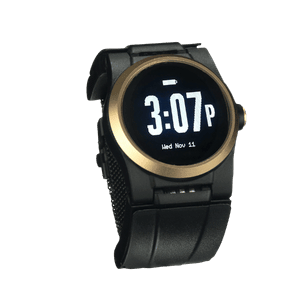
Most of the systems above can help in the right situation. The Kanega Watch is a medical alert watch built for older adults, and it makes three choices that set it apart from a traditional pendant or base-station setup.
It is built to stay on through charging
When Jean Anne Booth, the CEO and founder of UnaliWear, was looking for a medical alert system for her aging, independent mom, she was shocked to find all devices had to be removed to charge. She worried her mom would not be able to get help after a fall at night while a device was charging on her nightstand, or that she would forget to put it back on in the morning. This fear drove her to develop the swappable battery system in the Kanega Watch. When the batteries in the watch run low, the wearer simply swaps them out for charged batteries. The watch never leaves the wrist, so there are no gaps in protection. It is also safe to wear in the shower, another time of high risk for falls
Its fall detection is trained on real falls
Many fall detection algorithms learn from staged drops by young volunteers in a lab. RealFall™ fall detection was trained on actual falls from Kanega Watch wearers, with their permission, so it recognizes how older adults move in everyday life. As with any system, it does not catch every fall.
It connects to a monitored center, not just 911
When RealFall™ fires, or the wearer presses the button or speaks a command, the call goes to a US-based, Five Diamond certified monitoring center staffed around the clock. An agent assesses the situation, reaches family, and dispatches help with the wearer’s location. A consumer smartwatch on the same wrist would route that call to 911 with no agent on the line.
The Questions to Ask Any Provider Before You Buy
The fastest way to compare medical alert systems is to call each provider and ask the same questions. A friendly sales representative who answers plainly is a good sign. Vague answers are a sign too.
- Is the system monitored, and where is the center located? Confirm the center is staffed 24/7 with trained agents, and ask whether it holds a certification such as Five Diamond.
- What is the average response time? Many monitoring centers respond within well under a minute, though times vary by provider. Ask for the number in writing.
- Is fall detection included or an add-on? Some providers charge extra for it while a few build it in. Confirm which, since it changes your real monthly cost.
- How does the device charge, and when is it unprotected? Ask whether it needs nightly charging or supports swappable batteries, and how long it sits off the body.
- Does it work where my loved one lives and goes? Check cellular and WiFi coverage in the home and the areas they frequent.
- What are all the costs? Ask about the monthly fee with all ad-ons included, as well as any equipment fees, and any one-time charges for activation, installation, or shipping. Monitored systems charge a monthly service fee, so compare the full year, not the sticker price.
- Do I own the equipment or return it? When you pay an equipment fee you usually keep the device. When it is loaned with no fee, you return it if you cancel.
- Is there a trial period? Most reputable providers offer a 30-day money-back window. Use it. Have your loved one wear the device through a normal week and run a practice alert.
Write the answers in a simple chart, one provider per row. Comparing two systems is hard when each one prices things differently, and a side-by-side chart turns marketing into numbers you can actually weigh.
Choosing a medical alert system is really one decision in service of another: helping someone keep living on their own terms with a backup plan in place. The best system is the one your loved one will wear in the shower, through the night, and on the morning walk. As we wrote in Empowering Independence, the right device works like an invisible safety net that protects freedom rather than limiting it. Tools that provide reassurance can help reduce constant worry without asking anyone to give up the life they know.
If you want to talk through the options with no high-pressure sales, call 888-343-1513 or email community@unaliwear.com. Our Care and Safety Experts can walk you through plans, pricing, and whether the Kanega Watch fits your loved one’s routine.
Extending independence with dignity.