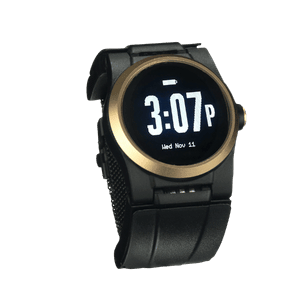
Your parent does not want a pendant. You do not blame them. A fall detection watch looks like a regular smartwatch, which is why so many families start here. The catch: an Apple Watch and a dedicated medical alert watch are not the same thing, and the difference shows up at the worst possible moment.
Key takeaways
- Apple Watch fall detection calls 911 directly and does not connect to a 24/7 medical alert monitoring center.
- A medical alert watch routes a detected fall to trained agents who already hold the wearer’s medical history.
- Apple Watch and Samsung Galaxy Watch detect hard, high-impact falls but can miss slow slumps and gradual slides.
- Apple Watch waits about a minute after a hard fall, then runs a 30-second countdown before calling emergency services.
- Consumer smartwatches require nightly charging, which leaves no fall coverage while the watch sits off the wrist.
- The Kanega Watch includes RealFall™ fall detection and uses swappable batteries, so charging never removes the watch.
- No fall detection watch catches every fall, so combining a watch with home safety steps improves protection.
Fall Detection Watches vs Consumer Smartwatches: What Is the Difference
A fall detection watch is a wrist-worn device that recognizes a fall through motion sensors and sends an alert without anyone pressing a button. That single sentence covers two very different products, and mixing them up is a common mistake families make.
The split comes down to who answers the call. That matters because fall risk is common: the Centers for Disease Control and Prevention reports that one in four adults 65 and older falls each year, and falls rank as the leading cause of injury in that age group. When a fall happens at home with no one around, the speed and quality of the response decide how the day ends.
Consumer smartwatch
An Apple Watch or Samsung Galaxy Watch is a consumer smartwatch first. Fall detection is one feature among hundreds. When it works, it calls 911 directly. There is no agent who knows your mother’s name, her heart condition, or which neighbor has a spare key.
Medical alert watch
A medical alert watch is built for one job: getting help when your loved one cannot. When it detects a fall, it connects to a 24/7 monitoring center, a staffed facility where trained agents receive the alert, talk to the wearer, and dispatch help with medical history already on file.
Why the label matters
The National Council on Aging makes the dignity case plainly: a medical alert watch looks like any other smartwatch, so other people cannot tell it is for emergencies. That is the appeal for a senior who refuses anything that signals frailty.
But appearance is where the similarity ends. A smart watch for seniors with fall detection built in still answers to 911, not to a person who has your file open. Keep that distinction in mind through the rest of this guide.
Fall Detection Watches and Bracelets Reviewed: Pros, Cons and Verdict
Wrist-worn options fall into three groups: consumer smartwatches, medical alert watches, and other medical alert wearables. Here is how the main devices stack up, drawing on Apple’s documentation, hands-on testing, and independent reviews. Confirm current pricing before you buy, since plans and promotions change.
Consumer smartwatches
Apple Watch (Series 9 and later)
Apple Watch fall detection targets sudden, high-impact falls and auto-enables for users 55 and older.
Pros: Familiar interface, strong health features, looks like a watch your parent already wants to wear.
Cons: It calls 911, not a monitoring center. It needs an iPhone and a cellular plan. It comes off every night to charge. Many seniors find the Apple Watch too complicated for their needs and dislike touchscreens with tiny app icons.
Verdict: A reasonable pick for a tech-comfortable senior already in the Apple ecosystem that doesn’t need the highest level of fall safety protection.
Samsung Galaxy Watch
Samsung watch fall detection works much like Apple’s: it looks for a hard impact, then calls your emergency contacts or services.
Pros: Solid Android-side alternative, comfortable fit, useful fitness tracking.
Cons: Same core limit as Apple. The alert routes to 911 or a contact list, the watch needs nightly charging, and the interface is not designed for older users.
Verdict: Fine for an active senior who lives in the Samsung world and wants basic coverage, not full monitoring.
Medical alert watches
Devices like the Medical Guardian MGMove and Bay Alarm Medical SOS Smartwatch put a monitoring center behind a smartwatch-style design.
Pros: Monitoring center response in a watch form factor. Lower stigma than a pendant.
Cons: Fall detection is often a paid add-on. You still remove the watch to charge, leaving gaps overnight.
Verdict: A strong middle option for families who want monitoring without a neck pendant and can manage gaps in protection while charging.
Kanega Watch
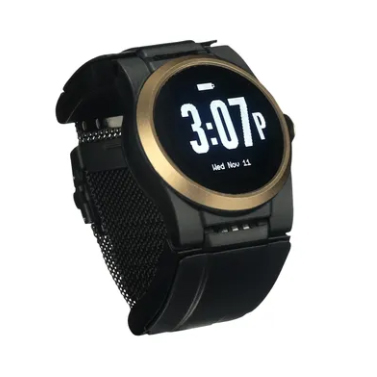
The Kanega Watch is a medical alert watch with RealFall™ fall detection included, a monitoring center, and swappable batteries so it never comes off to charge.
Pros: All-in-one pricing (including fall detection) with no add on fees, monitoring center with medical context, no charging gaps.
Cons: Higher monthly cost than a consumer smartwatch. No companion store or general-purpose features.
Verdict: Best fit for a fall detection watch for seniors who want a device they wear day and night and don’t want the complications of apps and touchscreens. More on why in the dedicated section below.
Other medical alert wearables
Fall detection bracelets and bands are another option some families consider instead of watches. Most are simple help-button bands or pendant alternatives without true automatic fall detection.
Pros: Light, low-profile, easy to wear.
Cons: Many lack motion-based fall detection entirely. Read the spec sheet before assuming a bracelet catches falls.
Verdict: Suitable as a backup button, rarely sufficient as a primary fall detection device.

How Apple Watch and Samsung Fall Detection Actually Perform
Apple Watch fall detection works, with one important qualifier: it is built for hard falls. According to Apple Support, if the watch detects a hard fall while you are wearing it, it taps your wrist, sounds an alarm, and starts a countdown.
The hard fall limit
A hard fall is a sudden, high-force impact, like tripping on a curb or slipping on stairs. A soft fall is slower: a slow slump from a chair, a gradual slide down a wall, or a faint from low blood pressure.
Consumer smartwatches are tuned for the hard kind. The bathroom slide and the slow collapse that send many older adults to the ER produce less force, and a watch can miss them.
A missed soft fall is how a senior ends up in a long lie, the time spent on the floor unable to get up before help arrives. NCOA flags the long lie as a serious risk, since extended time down can turn a recoverable fall into a hospital stay. A device that only catches hard impacts leaves that gap open.
How long before it calls
If Apple Watch detects a hard fall and then senses you moving, it waits for you to respond and will not call on its own. If it detects that you are immobile for about a minute, it begins a 30-second countdown, then calls emergency services automatically and plays a recorded message.
That logic prevents false alarms. It also means a senior who is conscious but hurt has to actively confirm they need help.
Wear in the shower and at night
Bathroom falls are among the most common, so where your loved one wears the watch counts as much as which watch they wear. Both Apple Watch and Samsung Galaxy Watch are water resistant enough for everyday water exposure, which is a real point in their favor.
The gap is overnight. A watch on the charger at 2 a.m. cannot catch the fall that happens on the way to the bathroom. A smart watch with fall detection only protects during the hours it is on the wrist and powered on.
Who it calls, and what it needs
When an Apple Watch places the call, it dials 911. Samsung’s setup is similar, routing to emergency services or your saved contacts.
Neither connects to a monitoring center that already holds your parent’s medications, conditions, and emergency contacts. Apple Watch fall detection also depends on the watch being charged, worn, and paired with an iPhone on a cellular plan. Every hour the watch sits on the charger is an hour without coverage.
Full Side-by-Side Comparison Table
The table below compares the main fall detection watch options on the features that decide real-world outcomes. Pricing is approximate and changes by plan.
| Feature |
Apple Watch |
Samsung Galaxy Watch |
Medical alert watches (MGMove / Bay Alarm) |
Kanega Watch |
| Fall detection |
Hard falls, built in |
Hard falls, built in |
Add-on on most plans |
Included (RealFall™) |
| Who responds |
911 |
911 or contacts |
Monitoring center |
Monitoring center |
| Medical history on file |
No |
No |
Yes |
Yes |
| Charging |
Nightly, off wrist |
Nightly, off wrist |
Nightly, off wrist |
Swappable battery, never removed |
| Phone required |
iPhone + cellular |
Samsung phone + cellular |
No |
No |
| Monthly cost (approx.) |
Cellular plan |
Cellular plan |
$35 to $45 + add-ons |
$84.95 ($64.95 paid annually) |
| Best for |
Apple users |
Samsung users |
Watch form + monitoring |
Day-and-night fall coverage |
No device on this list catches every fall. Treat the table as a guide to trade-offs, not a guarantee.
Why the Kanega Watch Comes Out on Top
Every watch above helps in the right situation. After weighing form factor, price, and who answers the call, three differences put the Kanega Watch ahead for families whose main concern is fall safety.
RealFall™ is trained on real falls
Most fall detection algorithms are based on lab simulations, where researchers stage falls with younger volunteers. RealFall™ was trained on actual falls from real Kanega Watch wearers, so it recognizes how older adults move when they go down.
As additional real-world fall data is collected, the RealFall™ detection model continues to improve its recognition of genuine falls over time. The Kanega Watch’s fall detection sensitivity is adjustable, allowing wearers to choose a sensitivity range that best matches their lifestyle. Wearers can also choose a shorter or longer alert delay, balancing faster emergency response with more time to cancel accidental alerts.
NY Times Wirecutter reviewed the Kanega Watch across four consecutive years of independent review. AgeTechForYou, a senior products review site, compared the Kanega Watch to the Apple Watch and laid out why a dedicated device handles emergency response differently.
It never comes off to charge
The Kanega Watch uses swappable batteries in the band. Once a day (typically upon getting up or right before bed), your loved one swaps depleted batteries for fresh ones without taking the watch off the wrist. Apple and Samsung watches dock every night, which is exactly when a senior gets up for the bathroom and falls.
For a parent who said they will not deal with nightly charging, this removes a real reason devices end up in a drawer.
The monitoring center knows your parent
When RealFall™ triggers, or your loved one presses the button or speaks a voice command, the call goes to a US-based, 24/7 monitoring center. Agents talk to the wearer, see the medical history already on file, contact family, and dispatch EMS to their location.
Apple Watch calls 911. The Kanega Watch calls people who have your parent’s file open before they say a word. That difference matters when seconds count.
Which Fall Detection Device Fits Your Lifestyle?
The right watch is the one your loved one will actually wear, every day, in the shower and through the night. Use these starting points.
- Choose an Apple or Samsung watch if your loved one is tech-comfortable, already wants the smartwatch features, and you both accept that it calls 911 and charges nightly.
- Choose a hybrid alert watch if you want monitoring center response in a familiar smartwatch shape and do not mind a fall detection add-on fee.
- Choose the Kanega Watch if fall response is the priority and you want a device with fall detection included, a monitoring center that knows your parent, and no charging gaps.
If your loved one lives alone and you cannot always answer the phone, lean toward a monitored device over a consumer smartwatch. A staffed center beats an unanswered ring.
Still weighing pendants and home sensors against a watch? Senior care writer Jenny Wisniewski’s medical alert buyer guide walks through every form factor and how to match one to your loved one’s routine.
The best fall detection watch is the one that fits your loved one’s real day. As we wrote in Empowering Independence, the goal is an invisible safety net that protects freedom instead of limiting it. A tool that quietly stands by can ease the worry without asking anyone to give up the life they know.
If you want to talk through options with no high-pressure sales, call 888-343-1513 or email community@unaliwear.com. Our Care and Safety Experts can walk you through plans, pricing, and whether the Kanega Watch fits your loved one’s routine.
Extending independence with dignity.