A panic button for elderly parents is a small help button, worn on the wrist or around the neck or mounted on a wall, that lets an older adult call for help with a single press. On monitored systems, that press reaches a 24/7 monitoring center where an agent can already have your parent’s address, medical information, and emergency contacts on file.
Most families end up here after an incident happens, such as a fall in the household. A hospital discharge with a walker and new prescriptions. A Sunday call that rang eight times before Mom picked up. You are not overreacting by reading about this, and nothing has to be decided today.
Three decisions sit ahead of you: whether a monitored device makes sense at all, which form factor fits your parent’s day, and which provider answers when the button goes off. Most families raise the same objection first: “My parent already carries a cell phone.” Whether that is enough depends on what happens when they need help.
Key takeaways
- A panic button is the help button in a personal emergency response system. In monitored systems it reaches a staffed 24/7 monitoring center instead of dialing 911.
- After a press, an agent opens two-way voice through the device, assesses the situation, and dispatches EMS using the address and medical profile already on file.
- Many monitored systems treat an unanswered alert as a potential emergency and follow the response instructions on file.
- The main types are pendant necklaces, wristbands, medical alert watches, wall buttons, and at-home consoles.
- Since April 2021, FCC rules have required nationwide carriers to deliver horizontal location within 50 meters, or a dispatchable location, for 80 percent of wireless 911 calls.
- NENA asks 911 centers to answer 90 percent of calls within 15 seconds, though a wireless call has to reach the right center first.
- A pressable button only helps someone conscious enough to reach it, so automatic detection and voice activation matter.
What Is a Panic Button for the Elderly?
“Panic button” is the everyday name for the help button in a personal emergency response system. The hardware is simple: a water-resistant button, a battery, a cellular or radio chip, and usually a speaker and microphone. What you are buying is the service behind it, a monitoring center staffed around the clock by trained agents who answer when that button fires.
Providers sell the same category under several names, which is half the reason shopping feels muddled. Medical alert. Personal emergency response system. SOS pendant. Help button. Our medical alert button guide makes the case for round-the-clock coverage in more depth. For your decision, the name on the box matters less than one question: does the press reach a trained responder or call emergency contacts directly?
How a Panic Button Works
An emergency panic button for elderly wearers works in two stages. The first is short: the signal leaves the device and reaches the monitoring center in seconds over cellular, WiFi, or a landline base unit. The second stage is where a monitored system differs from a simple auto-dialer: a trained agent reviews the alert and decides what help to send.
Providers call the setup a personal emergency response system, and PERS coverage options split by whether the device leaves the house. The press-to-dispatch path is the same either way.
The call flow, second by second
- The press. Your parent presses the help button. Some models respond to a single press, while others require the button to be held for a second or two. A tone, light, or vibration confirms the alert was received.
- The signal leaves the device. It travels over the provider’s cellular network, home WiFi, or a landline base station to the monitoring center. This usually takes seconds, not minutes.
- The account opens on an agent’s screen. The agent can see the address, apartment number or gate code, medical conditions, medications, physician, and emergency contacts already on file.
- The agent opens two-way voice. Your parent speaks directly through the device. There is no phone to find or unlock.
- The agent assesses the situation. Not every alert requires an ambulance. If your parent fell from a chair and simply needs assistance getting up, the agent may contact the neighbor or family member listed on the account.
- The agent dispatches help. If emergency services are needed, the agent contacts the appropriate 911 center and shares your parent’s location, the details of the emergency, and any relevant medical information already on file.
- The agent stays on the line. Many monitoring centers keep the voice connection open until help arrives, so your parent is not waiting alone.
- The agent contacts family. Once help is on the way, the monitoring center follows the emergency contact instructions on file.
When the wearer cannot answer
Silence is exactly the situation a monitored medical alert system is designed for. If your parent presses the button but cannot respond, the agent continues trying to communicate, listens for signs of breathing or movement, and follows the monitoring center’s emergency protocol. Depending on the situation, that may mean dispatching emergency services to the address on file and notifying the emergency contacts listed on the account. An unanswered alert is treated as a potential emergency, not as a technical problem.
The small enrollment details earn their keep here. A lockbox code gets responders through the door without breaking it. A note that your parent takes a blood thinner can change how paramedics respond to a head injury. None of that information travels automatically with a call from a mobile phone.
Who Needs One and Why
The National Institute on Aging folds emergency readiness into its guidance on aging in place, suggesting that anyone preparing for a medical emergency at home consider an emergency medical alert system: an electronic monitor a person wears, which alerts emergency personnel when that person becomes lost, falls, or needs urgent medical assistance. That describes the category well. It is for people whose worst day involves being unable to get help on their own.
Families usually start looking when one or more of the following is true. None is a verdict on anyone’s independence, and several are temporary.
- Your parent lives alone, or spends long stretches of the day alone.
- There has already been a fall, a near fall, or a bruise nobody wants to discuss.
- A hospital stay, surgery, or new prescription has changed their balance or blood pressure.
- A note that your parent takes a blood thinner changes how paramedics treat a head strike.
- They live with a condition that can remove warning or control: cardiac arrhythmia, seizures, hypoglycemia, Parkinson’s, or early memory changes.
- They use a cane, walker, or oxygen line, which makes getting up off the floor harder.
Types of Panic Buttons for the Elderly
Form factor decides where the button is when it is needed, which matters more than any spec sheet line. A panic button necklace for elderly wearers is still the most common design, because a pendant hangs at the chest where a hand finds it without looking. Wrist devices trade button size for the fact that a wrist is always attached to an arm.
| Type |
Where it lives |
Suits |
Main limitation |
| Pendant necklace |
Neck, outside clothing |
Anyone wanting the largest button |
Comes off at night, swings away in a fall |
| Wristband |
Wrist, like a bracelet |
People who want the button attached to the body |
Smaller button, some carry no speaker |
| Medical alert watch |
Wrist, reads as a normal watch |
Active older adults who go out |
Charging routine varies by model |
| Wall-mounted button |
Bathroom, bedside, stairwell |
High-risk rooms, as a second layer |
Useless unless the fall lands within reach |
| At-home base console |
One central room, plugged in |
Homes wanting a loud speakerphone |
Limited range, nothing off the property |
Pendant, wrist, and medical alert watches move with the person, but only cellular models work past the driveway. Many providers will add wall buttons to the same account, which suits a house with a basement or a walk-in shower.
Wearable vs. Wall-Mounted: Which Is Right for You?
Picture one event two ways. Your mother catches her foot on the bathroom threshold at 6 a.m. and goes down in the hallway. If she is wearing a button, one press starts the sequence above. If her only button is mounted beside the shower two rooms back, she is looking at a wall she cannot reach.
|
Wearable button |
Wall-mounted button |
| Coverage |
Moves with the person, indoors and out |
One fixed spot in one room |
| After a fall |
Within reach as long as it was worn |
Only if the fall lands beside the unit |
| Power |
Rechargeable or swappable battery |
Long-life cell or hardwired |
| Away from home |
Works anywhere with signal |
No coverage |
| Cost |
Higher, bundled into monitoring |
Low, often an add-on |
For most households the answer is both, with the wearable as primary. A wall button makes a good second chance and a poor only chance.
Key Features That Actually Matter
Feature lists run long, and many entries describe the same capability under different names. A handful of features make the biggest difference in an emergency. Two-way voice through the device lets the agent hear what is happening instead of responding to a signal alone. A monitored connection sends the alert to a trained agent rather than auto-dialing a preset number and hoping someone answers. Cellular connectivity, with WiFi support on compatible devices, helps keep the device connected at home and away from it.
Automatic fall detection deserves its own line. Sensors watch for the motion pattern of a fall and can send an alert without a button press, covering situations where the wearer cannot call for help themselves. No system detects every fall, and no honest provider claims otherwise, so treat it as an added layer rather than a guarantee. Voice activation closes a related gap, and hands-free voice activation matters most for arthritis, Parkinson’s, tremor, or a fall that traps an arm. Everything else on a spec sheet is secondary to those five features.
The Problem With Relying on a Phone in an Emergency
The phone objection deserves a full answer rather than a brush-off. A cell phone is an excellent emergency tool for someone upright, alert, and holding it, and it stops being one the moment any of those three is untrue. A phone charging in the kitchen is not a safety device for someone lying in the bathroom, and neither is one that skidded under the dresser.
The second problem is quieter. Even when the call connects, what reaches the 911 center is often less precise than families assume, especially indoors.
What a phone asks of the person who fell
A phone only helps if your parent can reach it and use it. After a fall, that may not be possible. The phone could be across the room, under a piece of furniture, or simply out of reach. Even if they can get to it, they still need to unlock it, place the call, and explain what happened. A side-button emergency shortcut can help, but it still assumes the phone is nearby and your parent is able to use it.

What a 911 center receives from a mobile call
The FCC splits wireless 911 location into two phases. Phase I delivers the caller’s callback number and the location of the cell site handling the call. Phase II delivers latitude and longitude, accurate “generally to within 50 to 300 meters, depending on the type of technology used.” Indoor rules have tightened since. Under the FCC’s location accuracy benchmarks, nationwide carriers have had to deliver horizontal location within 50 meters, or a dispatchable location, for 80 percent of wireless 911 calls since April 2021. Carriers that deploy vertical, z-axis technology must place the handset within plus or minus 3 meters for 80 percent of the calls made from a z-axis capable device.
Fifty meters is a radius, not a doorway. In a dense apartment block, that circle holds several addresses. The National Emergency Number Association notes that reaching 911 from a cell phone differs from a wired phone and varies greatly around the country, and that a wireless call may not be routed to the most appropriate 911 center at all. NENA’s call processing standard asks centers to answer 90 percent of 911 calls within 15 seconds. That is fast, but speed at the wrong center still costs a transfer. A monitoring center starts from a verified address, an apartment number, and a lockbox code entered months earlier.
What to Look For Before You Buy
The best panic button for elderly parents is the one whose monitoring center picks up quickly, knows your parent’s medical history, and stays on the line until responders arrive. That is more a service question than a hardware one, and most of it can be answered in a single phone call. Jenny Wisniewski’s guide to sorting through the features walks through the buying process in more detail.
On cost, expect two numbers: a monthly monitoring fee and a one-time equipment or activation charge. Some providers fold the hardware into a higher monthly rate, others bill it up front, and add-ons may be priced separately. Ask for the full first-year cost in writing, confirm the current published pricing, and check who owns the equipment if you cancel.
Before choosing a provider, ask:
- Is the monitoring center staffed 24/7, and where is it located?
- Does it hold an independent certification, such as TMA Five Diamond?
- How quickly does an agent typically answer after an alert is received?
- What happens if the wearer does not respond?
- Can you store medical conditions, medications, physician information, and a lockbox code?
- Who is contacted after emergency services, and in what order?
- What are the trial period and cancellation policy?
- Can you place a practice alert during the trial so your parent knows what to expect?
One certification you can verify yourself
The Monitoring Association grants its Five Diamond designation annually, against five points of excellence. One of them requires 100 percent of a center’s operators to be certified through TMA’s online training series, and certified operators must recertify every three years. Not the only quality signal, but one you can check yourself on TMA’s published list.
Why the Kanega Watch Is More Than a Panic Button
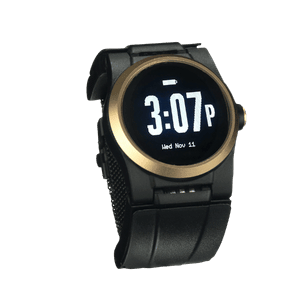
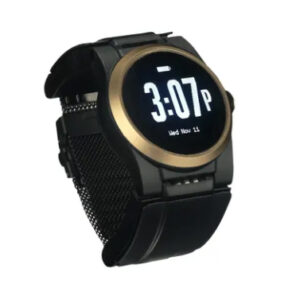
Everything above leads to one limit no button design solves: a button works only if the wearer is conscious, oriented, and able to reach it. That is the moment families fear most. The Kanega Watch was built around that gap, with three ways to reach the same US-based monitoring center.
It can call for help without a press
RealFall™ triggers an alert when the watch recognizes the motion pattern of a fall, so a wearer who is knocked out or too disoriented to act can still trigger an alert without pressing the button. The algorithm was trained on actual falls from real older adult wearers, not only on staged laboratory drops. No fall detection system catches every fall, and we say that plainly. Kanega also answers a spoken request for help, for the times a hand cannot reach the button.
It is never off the wrist to charge
Kanega uses swappable band batteries. When they run low, the wearer swaps in a freshly charged pair and the watch stays on the wrist. Any device that recharges on a cradle is off the body for however long that takes, and that is time with no protection.
It reaches a monitoring center, not a dial tone
A press, a spoken phrase, or a RealFall™ alert all land at a US-based, Five Diamond certified monitoring center staffed around the clock. Agents open two-way voice through the watch, work from the stored profile and verified address, dispatch emergency services, then call family. That is the sequence described earlier, running on a device that looks like a watch.
A panic button answers a narrow question: how does someone summon help while they can still ask for it. Widening that question is what protects independence, because it lifts the condition attached to every plain button, which is that your parent has to be well enough to use it. If you want to talk it through with no high-pressure sales, call 888-343-1513 or email community@unaliwear.com. Our Care and Safety Experts can walk you through plans, pricing, and whether the Kanega Watch fits your loved one’s routine.
Frequently Asked Questions
What happens if my parent presses the button by accident?
An agent comes on the line and asks what is happening. Your parent says it was a mistake, the agent confirms the account details, and the alert closes. Centers expect accidental presses and treat them as routine. It is worth explaining this early, because worrying about bothering someone can make people hesitate to press the button when they need help.
Can a panic button call a family member instead of 911?
Yes, on most monitored systems. You set the contact order at enrollment and can change it later, so a neighbor two doors away can sit above a daughter three states away. Ask one specific question before you sign: what the center does when the family contact does not pick up. The answer you want is that it escalates to emergency services rather than working quietly down the list.
Does a panic button work during a power or internet outage?
Ask before you assume. At-home consoles usually carry a backup battery, though runtime varies by model. Get the number for your system in writing. Get the number for your model in writing. Cellular devices do not depend on home WiFi or household power. Ones that rely only on home internet do.
Is a panic button the same as a medical ID bracelet?
No, and the National Institute on Aging lists them separately. A medical ID carries information, telling a paramedic about an allergy or an implanted device once they are already standing over the person. A panic button summons that paramedic in the first place.
How long does it take for help to arrive after the button is pressed?
That depends on where your parent lives more than on which device they own. The provider controls a short stretch: the signal reaches the center in seconds, then an agent comes on the line. Arrival time after that belongs to local EMS, and a national analysis in JAMA Surgery put the median response at 6 minutes in urban zip codes and 13 minutes in rural ones, with nearly 1 in 10 rural calls waiting close to half an hour. Ask the provider for their measured average from signal to agent voice, then ask the county about ambulance response. Only one of those numbers is for sale.