A free panic button is good enough when a reliable person answers the phone at three in the morning and can reach your parent quickly. It stops being good enough when no such person exists, because a button with no monthly monitoring usually contacts 911 or a designated family member instead of a professional monitoring center.
That is a tradeoff, not a fraud. Plenty of families choose that option deliberately because it fits their situation.
Search for a free panic button for elderly parents and you’ll find several very different offers using the same word. “Free” might mean a device you buy outright with no monthly fee, free equipment that comes with a paid monitoring plan, a free trial that later converts to a subscription, or a device provided through a public assistance program.
Those are very different offers, and the difference matters far more than the sticker price. This guide explains what each option provides, what happens after the button is pressed, what monitored service actually costs, and where genuinely free help may be available.
Key takeaways
- Free and no-monthly-fee alert buttons are real, and the savings come from removing professional monitoring, not cheaper hardware.
- NCOA distinguishes between monitored systems, which reach a staffed monitoring center, and unmonitored ones, which contact 911 or preset contacts directly.
- FTC guidance is blunt: if you pay shipping or fees to get a “free” trial, it is not free, and terms belong at the outset of the offer.
- A trial that converts into automatic billing is a negative option, and the FTC opened a new rulemaking proceeding on those in March 2026.
- The true cost of a monitored system depends on the monthly fee, equipment charges, whether fall detection is included, and any activation or cancellation fees.
- Some Area Agencies on Aging and many state Medicaid waivers cover emergency response systems for those who qualify.
Why Free Panic Buttons Sound Like a Great Deal (and Why Families Regret Them)
The appeal is honest arithmetic. Forty dollars a month is $480 a year, and on a fixed income that is a heating bill or a bad quarter of co-pays. Nobody choosing the cheaper option is careless about a parent. A free alert button for seniors is usually one of four transactions:
- Buy it once, own it. One-time price, no subscription. It dials 911 or a list you program.
- Free equipment with a monitoring contract. The provider absorbs the hardware cost because you pay for the service.
- A free trial that converts. Thirty days free, then automatic renewal until you cancel.
- A loaned or funded unit through a public program. Some Area Agencies on Aging and state Medicaid waivers pay for both.
Three of these are legitimate ways to get a medical alert device. The one that deserves extra scrutiny is the free trial that automatically converts to a paid subscription.
What “free” is supposed to mean
The FTC’s Guide Concerning Use of the Word “Free” (16 CFR Part 251) says the terms for receiving and keeping a free item belong clearly and conspicuously at the outset, not in a footnote behind an asterisk. Its consumer guidance is plainer: free means free.
Where the regret comes from
Families regret two things. The first is a bill nobody expected, which the FTC calls a negative option: you get billed because you did not say no. In March 2026 the agency issued an advance notice of proposed rulemaking on its Negative Option Rule and asked the public to comment. The second regret is quieter. The device worked, and help still did not come.
What You Actually Get With a Free Unmonitored Device
A monitored system connects the wearer to a professionally staffed monitoring center where an operator decides what help is needed. An unmonitored device contacts 911 or a designated care partner instead, which is why these systems typically do not charge a monthly monitoring fee. The longer version of what monitored buttons do is in that guide.
| The minute after the button is pressed |
Unmonitored device |
Monitored system |
| Who answers |
A 911 dispatcher, or whoever picks up |
A trained agent, 24/7 |
| If nobody answers |
It works down the list, then stops |
The agent keeps working and can dispatch EMS |
| Medical history on file |
Not held by anyone |
Held and relayed to responders |
| Up-front cost |
Full price of the hardware |
$0 to $299 among the providers cited here, then a monthly fee |
When a free device is the honest right call
A no-monthly-fee button suits a specific household, and suits it well. Your parent is steady on their feet, shares a wall with a daughter who answers her phone, and the realistic risk is a stumble in the kitchen at four in the afternoon, not a collapse alone at night. There, a device that reaches a person who reliably picks up is a sound purchase. The question was never the price. It is whether a specific named human being will pick up.
The Moment a Free Panic Button Fails and What Happens Next
Picture a Tuesday at 2:40 in the morning. Your father gets up for the bathroom, catches his heel on the rug, and goes down hard in the hallway. He is conscious, but his hip will not take weight. He presses the pendant button at his neck, and the device does what it was built to do.
- It dials your cell phone, face down on the nightstand on Do Not Disturb.
- Next in the sequence, your brother in Denver, asleep two time zones behind.
- Then the neighbor across the street, who moved in March and never came off the list.
- It reaches the end, stops, and has no further instruction.
Nobody assessed the situation. Nobody decided an ambulance was warranted. Nobody knows a call went out, because no one’s job is noticing silence.

The same three minutes, monitored
A staffed monitoring center answers directly. An agent speaks to your father through the device, hears that he cannot get up, and sends emergency services to an address already on file with his medications and the lockbox code. If you do not answer, the ambulance comes anyway. Someone is accountable for the outcome.
The direct-to-911 version
Some no-monthly-fee devices skip the contact list and call 911. A dispatcher will answer, which is better. What the dispatcher gets is an address and, at best, a voice: no medical history, no medication list. If your father cannot speak, that is all anyone has.
What Real Protection Actually Costs and Why It Is Worth It
Compare a no-monthly-fee device with a monitored system and the tradeoff becomes clearer. A no-monthly-fee device usually costs more upfront because you purchase the hardware outright, while a monitored system spreads more of the cost across an ongoing monthly service. The total also depends on whether fall detection is included, whether equipment is purchased or leased, and whether activation or cancellation fees apply.
The monthly rate is rarely the whole story, which is why the questions to ask providers matter more than the advertised price. Before comparing plans, get four things in writing: the monthly monitoring fee, any equipment cost, whether fall detection is included or costs extra, and the cancellation terms. If you’re considering a wearable rather than a traditional pendant, our emergency smartwatch comparison explains the differences.
Where genuinely free help still exists
This part sends you away from every product here, and belongs anyway. An Area Agency on Aging is a public or private nonprofit agency your state designates to help older adults stay in their homes, and some loan or fund emergency response equipment. State Medicaid waivers also cover personal emergency response installation and monitoring for people who meet a nursing facility level of care, as South Carolina’s Community Choices Waiver shows on its waiver factsheet. What is offered, and to whom, varies by state and by county.
How the Kanega Watch Gives Families Full Peace of Mind
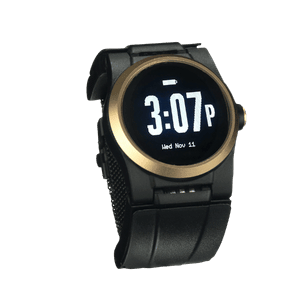
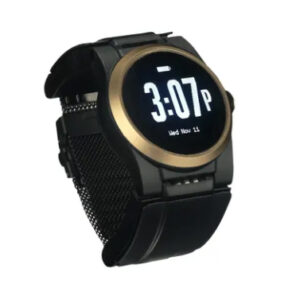
Four sections in, the thing worth paying for is the person who answers when your phone is face down on the nightstand. That is the line item a free device removes, and the one we built the Kanega Watch around.
Monitoring that does not depend on who picks up
When RealFall™ detects a fall, or your loved one presses the button or speaks the command, the alert reaches a US-based, Five Diamond certified monitoring center staffed 24/7. Agents assess, contact family, and dispatch help with the wearer’s location and history on file. RealFall™ was trained on actual falls from real Kanega wearers rather than staged drops in a lab, and no system detects every fall. New York Times Wirecutter has included the watch in four consecutive years of independent review, and its current medical alert assessment names the Kanega Watch its pick for on-the-go.
The honest answer on money
The Kanega Watch is not the budget option, and pretending otherwise would undo everything above. As of August 2026, published pricing is a one-time $299 for the watch, accessories, and setup, plus $84.95 a month, or $64.95 monthly paid annually. Fall detection is included rather than an add-on, and there is no contract, a 30-day money-back guarantee, and discounts for AARP members and retired military families. If it is still out of reach, work the Area Agency on Aging route first. We would rather your parent have coverage from someone else than an unanswered contact list from us.
Independence is the point. Your parent keeps the morning walk, the shower with the door closed, and the night alone, because the plan underneath does not rely on luck. To talk it through with someone who is not working from a script, call 888-343-1513 or email community@unaliwear.com. Our Care and Safety Experts can walk you through the Kanega Watch plan, pricing, and whether it fits your loved one’s routine.
Frequently Asked Questions
What should I ask before I accept a free equipment offer?
Get three answers before you hand over a card number, per FTC guidance: exactly what you are agreeing to, how long the trial lasts, and how and when to cancel. Watch for pre-checked boxes, which the FTC singles out as a way charges get authorized unread. Ask about restocking fees as well, since a return charge on a “risk-free” trial is lawful when it is disclosed up front and a shock when it is buried.
Do any no-monthly-fee buttons include fall detection?
Some do. Fall detection is becoming more common on no-monthly-fee devices, so check the specifications for the exact model rather than assuming every device includes it. Fall detection can shorten the time between a fall and a response, but no system detects every fall.
Can a no-monthly-fee button work alongside a monitored system?
Yes. A monitored wearable plus a cheap button by the bed is a reasonable backup, though two devices mean two batteries to forget.
How do I find out whether my parent qualifies for help paying?
Ask your local Area Agency on Aging two things by name, because that is how the funding is catalogued: personal emergency response system installation, and personal emergency response system monitoring. Those are the line items in state Medicaid waiver service lists, and waiver eligibility usually turns on a nursing facility level of care assessment, not income alone. Answers differ by county, and the wait can run months.