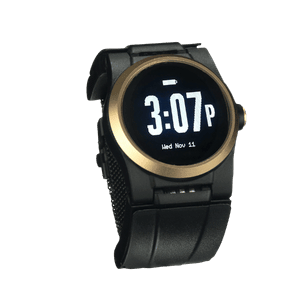
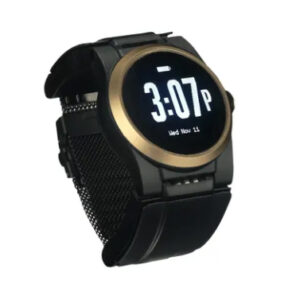
A caregiver smartwatch for elderly parents is a wrist-worn safety device that shares emergency information with family members, not just a monitoring center. That family-facing connection is what sets this category apart from a standard medical alert device.
Not every device works the same way. Some notify family after contacting emergency services, others rely mainly on family notifications, and some combine family updates with professional monitoring. Knowing who receives an alert, and when, is one of the most important buying decisions.
This guide explains what information leaves the watch, who receives it, and what both your parent and your family can expect during an emergency.
Key takeaways
- A caregiver smartwatch is defined by its second outbound path: the alert reaches a family member as well as, or instead of, a monitoring center.
- Consumer smartwatches and monitored medical alert watches notify family members differently, so check who receives an alert and when.
- FDA guidance says inclusion under its general wellness policy “does not establish that it has been shown to be safe and/or effective for its intended use.”
- No system detects every fall, and Apple documents that its watch “cannot detect all falls.”
- Settle in advance whether a device shares emergency alerts only, location on request, or daily activity.
How Caregiver Smartwatches Differ From Standard Medical Alert Devices
A standard medical alert device has one job in an emergency: connect the wearer to a trained responder. The alert opens a two-way call to a monitoring center, an agent assesses and dispatches EMS, and the family hears afterward. A caregiver smartwatch adds a second path.
That second path is the category, and it explains why one label covers different hardware. A listing sold as a smart caregiver monitor could be any of the three below. Sorting out medical alert watch differences saves a round of shopping.
| Sold as |
Usually is |
Alert goes to |
| Senior device with family app |
Monitored wearable plus a caregiver notification layer |
Monitoring center, then family |
| Caregiver companion device |
App mirroring a separate senior-worn sensor |
The caregiver only |
| Smartwatch with family sharing |
Apple Watch or Galaxy Watch with emergency contacts set |
An emergency number, then contacts if set |
Follow one alert from the wrist to your phone
- On the wrist. Most smartwatches use motion sensors to determine whether a fall may have occurred.
- The cancel window. The watch taps, sounds an alarm, and shows an alert. If it senses movement, it waits for a response. After about a minute of immobility, it starts a 30-second countdown that the wearer can still cancel.
- What leaves the watch. Depending on the device, the alert is sent over a cellular connection, Wi-Fi, or a paired smartphone. For example, Apple documents that Fall Detection requires satellite, cellular, or Wi-Fi Calling with internet from the watch or a nearby iPhone.
- Who picks up. Consumer smartwatches typically call emergency services directly. Monitored medical alert watches connect first to a staffed monitoring center, where an agent can assess the situation before contacting emergency services if needed.
- What your phone shows. Family notifications vary by device. Some consumer smartwatches notify emergency contacts after emergency services have been contacted, while monitored medical alert systems can keep family members updated throughout the response.
- What your parent sees. An alert, a countdown, a cancel option, then either a call to emergency services or a live conversation with a monitoring center.
What Families Should Look For: Monitoring, Alerts, Fall Detection, and Design
Feature lists here look identical. Four questions pull them apart: who answers when an alert is triggered, what reaches your phone and when, what the device does about falls, and whether your parent will keep it on overnight.
Put the first question bluntly to any product marketed as a caregiver alert monitor. At 2am, when the alert fires and nobody picks up, what happens next? A product whose escalation chain ends at your phone has no answer. A monitored system does, because the chain continues to a staffed center. The daily texture of real-time monitoring for families is its own subject; the buying question is mechanical.
What Apple and Samsung actually document about falls
Apple Watch SE and later, Series 4 and later, and Apple Watch Ultra or later detect a hard fall, then dial emergency services if the wearer stays immobile. On the Galaxy Watch, Hard fall detection sits under Safety and emergency, where Samsung’s documentation says the wearer picks the emergency number and whether information goes to emergency contacts.
Both target hard falls, and both watches come off the wrist to charge. Apple states plainly that the watch “cannot detect all falls” and may read high-impact activity as one. No system detects every fall, and the fall sensor accuracy comparisons cover how device types score on slow slumps.
What the FDA has reviewed, and what it has not
Most of what a consumer smartwatch does sits inside a regulatory category families never hear about. The FDA’s General Wellness: Policy for Low Risk Devices, reissued January 6, 2026, covers low risk products intended only for general wellness use, things like activity and sleep tracking, and says the agency’s device center does not intend to examine them.
One sentence is worth reading twice: “A product’s inclusion under the general wellness policy in this guidance does not establish that it has been shown to be safe and/or effective for its intended use.” Emergency fall alerting is a harder case than step counting, and the guidance does not resolve it. What the support pages do settle is an absence: neither Apple nor Samsung claims FDA clearance for fall detection.
Shared information, and who agreed to share it
Imagine your phone lighting up at 11 p.m. with a fall alert. Ninety seconds later a second message says the wearer cancelled it, and by then she has her shoes on. Her father went back to bed with no idea anyone had been notified. Nothing malfunctioned.
Settling the scope beforehand prevents that. Three arrangements get sold under one name: emergency alerts only, location on request, and continuous activity summaries. Ask which is the default, and whether your parent can change it themselves.
The Kanega Watch as a Caregiver Smartwatch: What Families See and What Seniors Experience
This heading names both ends of the data path. Families need to stop guessing during an emergency. Older adults need a watch that does not report their Tuesday.
What the family sees
UnaliCare™ Connect sends text updates to the trusted contacts an enrolled wearer designates: when help is requested, when responders are dispatched, and when the alert is resolved. One daughter, quoted in our notes on keeping families informed after her father fell while working in his yard, put it in four words: “I didn’t have to wonder.” What families do not get is a feed of ordinary days.
What the senior experiences
On the wrist it reads as a watch. Underneath it is a monitored medical alert device, not a consumer smartwatch. RealFall™ was built from the movement patterns of real falls by real wearers, not staged laboratory drops, and it keeps learning the wearer’s own movements. Because the batteries live in swappable bands, it never comes off to charge. When something happens, a voice comes through from a US-based, Five Diamond certified monitoring center staffed around the clock, and an agent speaks with your parent while help is arranged. No system detects every fall, and this one works alongside check-ins and home safety work.
The aim is a parent who keeps living the way they choose, with less worry landing on the people who love them. RealFall™ fall detection and a staffed center exist so neither person carries the plan alone.
If it would help to think this through with someone who is not reading from a script, call 888-343-1513 or email community@unaliwear.com. Our Care and Safety Experts can walk you through plans, pricing, and whether the Kanega Watch fits your loved one’s routine.
Frequently Asked Questions
Is a video monitor better than a wearable for an elderly parent?
They solve different problems. A smart caregiver video monitor watches a room, so it helps only where you install one, and it shows what happened rather than getting someone to your parent. A wearable travels with the person and can open a call for help. Cameras also carry a heavier consent load. UnaliWear does not make them.
Does a caregiver smartwatch need my parent’s smartphone to work?
That depends on the device and on how it was activated. Samsung notes that a watch showing “Emergency calls only” has no LTE service turned on and cannot send an SOS without a paired phone. A cellular Apple Watch needs its own active line as well. Dedicated medical alert watches arrive with the connection already in place.
How quickly does the family notification actually arrive?
Fast matters less than reliable. On an Apple Watch the family list comes from the Medical ID, and Apple notes contacts are not notified automatically if the Messages app has been deleted or replaced as the default. Check both before anyone counts on that text arriving.